
The 2026 Social Media Asset Specification Guide: Optimizing Visuals for Every Platform
Optimize social media image sizes and aspect ratios across major platforms. Learn how centralized workflows prevent distortion and compression.
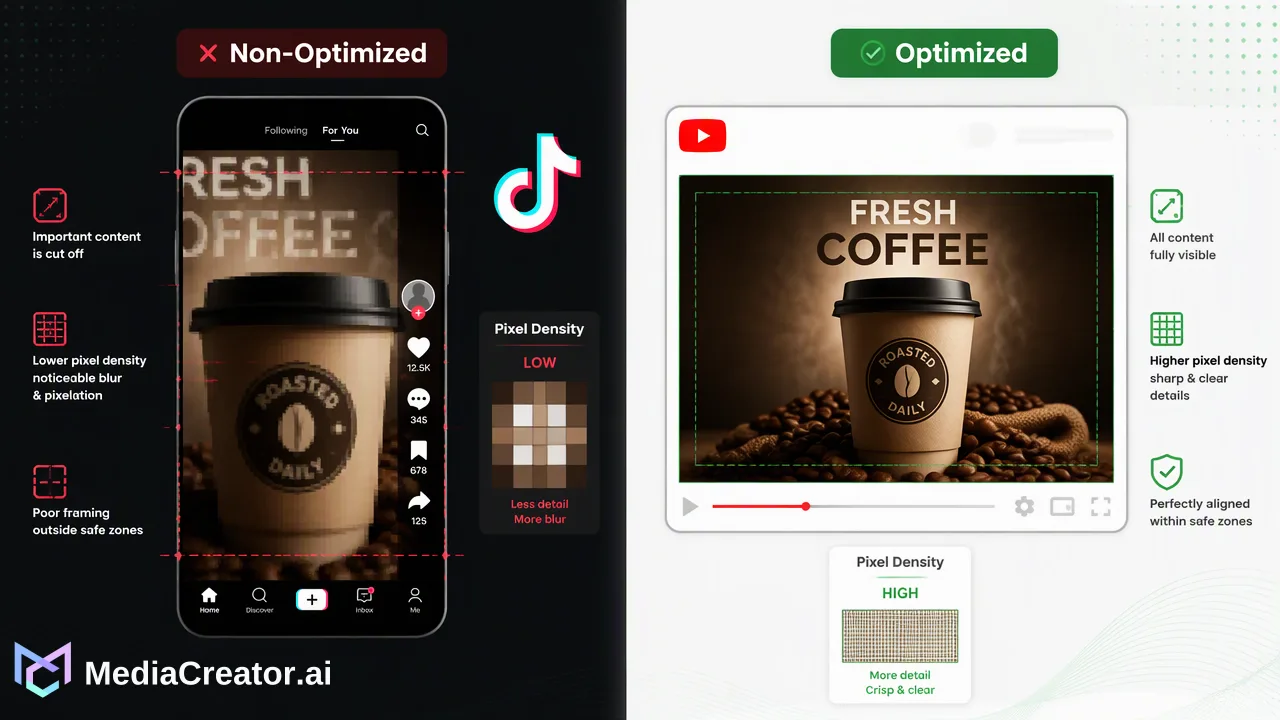
A comprehensive guide to managing platform-specific social media image specifications, mobile-first aspect ratios, and visual asset workflows across TikTok, Instagram, Facebook, and YouTube.
Maintaining a consistent brand identity across social channels requires adhering to platform-specific visual specifications rather than distributing a single, universal asset. Because networks such as TikTok, Instagram, Facebook, and YouTube apply distinct compression algorithms, display containers, and aspect ratios, publishing non-optimized creative leads to automated cropping and clarity loss. A modern production workflow pairs mobile-first dimensions—specifically 4:5 vertical feed ratios and 9:16 full-screen vertical formats—with centralized multi-platform previewing to protect visual quality across every profile.
The Importance of Platform-Specific Visual Standards
A technical requirement defined by social platforms—encompassing aspect ratios, pixel dimensions, container boundaries, and compression thresholds—governs how visual content renders across varying screen resolutions. When creative teams deploy a single master graphic across diverse channels without modification, platform delivery pipelines intervene. Native feeds automatically crop excess margins, stretch misaligned dimensions, or trigger lossy compression that degrades high-resolution brand photography and text elements. Adhering to native specifications safeguards brand integrity. For instance, profile photos, header banners, in-feed static posts, and vertical stories each occupy distinct display containers. When assets match native specifications, platforms can display them without arbitrary clipping of logos or key typography. Treating visual asset optimization as a foundational operational discipline ensures that brand presentation remains sharp, legible, and uniform across audience touchpoints.
Mobile-First Standards and Primary Feed Ratios
Audience viewing behavior has driven a decisive shift toward mobile-first aspect ratios. Modern social feeds favor vertical orientations that maximize screen real estate on handheld devices, moving away from legacy square or landscape formats as primary post choices. Two core standards define feed and full-screen environments:
- 4:5 Vertical Feed Ratio: Commonly used for feed graphics, carousels, and portrait photography. The 4:5 ratio occupies substantially more vertical screen height than 1:1 square or 16:9 landscape assets, reducing adjacent feed distractions while keeping visual elements centered. - 9:16 Full-Screen Vertical Ratio: The standard format for immersive vertical feeds, stories, and short-form video ecosystems across TikTok, Instagram Reels, Facebook Stories, and YouTube Shorts. This format requires careful positioning of safe zones to avoid interference from platform UI elements, buttons, usernames, and sound captions. | Format Type | Common Ratio | Typical Placement | Key Composition Rule | | :--- | :--- | :--- | :--- | | Vertical Feed | 4:5 | In-feed posts and carousels | Center focal points to avoid top/bottom thumbnail cropping | | Full-Screen Vertical | 9:16 | Stories, short-form video feeds | Respect header and footer interface safe zones | | Landscape/Horizontal | 16:9 | Long-form video thumbnails, banners | Ensure core copy is legible at small mobile scales | | Square Asset | 1:1 | Grid displays, legacy feed tiles | Maintain balanced margins around central subjects | Because each placement serves a distinct interface role, repurposing identical source material across these categories requires intentional reformatting rather than simple geometric stretching.
Centralizing Asset Management Across Channels
The most frequent operational failure in multi-channel distribution is relying on a single, non-optimized asset across divergent social networks. Decentralized workflows—where individual team members manually download, adjust, and upload files across disparate tabs—inevitably introduce human error, inconsistent aspect ratios, and misplaced creative elements. Centralizing asset management eliminates these bottlenecks. By maintaining a structured digital workspace, creative operators organize primary source assets, standardized templates, and final derivatives in one location. This structure prevents cross-posting errors where desktop-formatted landscape banners are erroneously pushed to mobile vertical feeds. Centralization also simplifies brand updates: when a platform alters its container specs or visual requirements, teams update central guidelines rather than resolving isolated issues across multiple active campaign folders.
Adapting and Previewing Visuals with MediaCreator.ai
To execute platform-specific optimization at scale, operational teams require publishing infrastructure that supports cross-channel adaptation within a single interface. MediaCreator.ai is a web-based social media management and AI creation platform designed for creators, small teams, studios, agencies, and brand businesses. Supporting direct OAuth 2.0 connections across TikTok, Instagram, Facebook, and YouTube, the platform eliminates password sharing and unstable browser extensions while managing multiple accounts per channel. Within MediaCreator.ai's Cross-Platform Publishing Calendar, teams compose a post once and adapt its visual assets and messaging specifically for each connected channel. A critical feature of this workflow is per-platform previewing: operators can inspect exactly how an image or video renders inside the specific user interface of TikTok, Instagram, Facebook, and YouTube before deployment. This preview step confirms that text fits within safe zones, focal points remain uncropped, and composition adheres to native standards. When additional creative iteration is required, optional tools like Content Studio allow teams to generate images and video, storing outputs directly into the shared media library. When using optional AI writing assistance, confirm cards require human review before publishing, ensuring no content is distributed without deliberate team approval. Once reviewed, assets are mapped across draft, queued, and published states on a unified visual calendar, providing clear visibility over scheduled campaigns.
FAQ
Why do images appear blurry or distorted after upload?
Social networks apply aggressive automated compression when uploaded files deviate from expected dimensions, aspect ratios, or resolution standards. If an asset exceeds the target boundary or uses an unsupported container ratio, the platform forcibly scales and re-compresses the image. Uploading assets prepared to native specifications minimizes server-side processing, preserving edge clarity and typographic legibility.
How often should creative teams update visual asset templates?
Creative teams should audit visual templates whenever networks introduce interface modifications, such as revised navigational overlays, feed margins, or profile photo placement. Maintaining a structured, centralized template system ensures that design guidelines can be updated systematically, preventing team members from publishing assets using obsolete dimensions.
What is the most effective workflow for managing multi-platform image sizes?
The most effective workflow centralizes master assets within a unified environment where content can be adapted to platform-specific requirements before scheduling. Rather than manually resizing and posting file-by-file across native apps, teams utilize cross-platform publishing dashboards to preview native rendering across TikTok, Instagram, Facebook, and YouTube prior to deployment.
Learn More
Choose the product information that fits the next step in your workflow.
Get Started with MediaCreator.ai
Discover the power of AI-driven content creation
Related Articles
Continue learning with these related guides
Beyond Vanity Metrics: A Workflow Guide to Measuring and Improving Social Media Engagement
Build an actionable social media engagement strategy. Learn how to track high-intent metrics, centralize conversations, and refine publishing workflows.
BlogMastering Social Media Algorithms: A Workflow Guide for Algorithmic Optimization
Learn how a structured social media algorithm optimization workflow helps teams adapt content, schedule posts, and review cross-platform analytics.
Blog