
How to Fix AI Video Dubbing Pronunciation for Names and Product Terms
A practical review process for names, product terms, and translated lines in AI-dubbed social videos before scheduling.
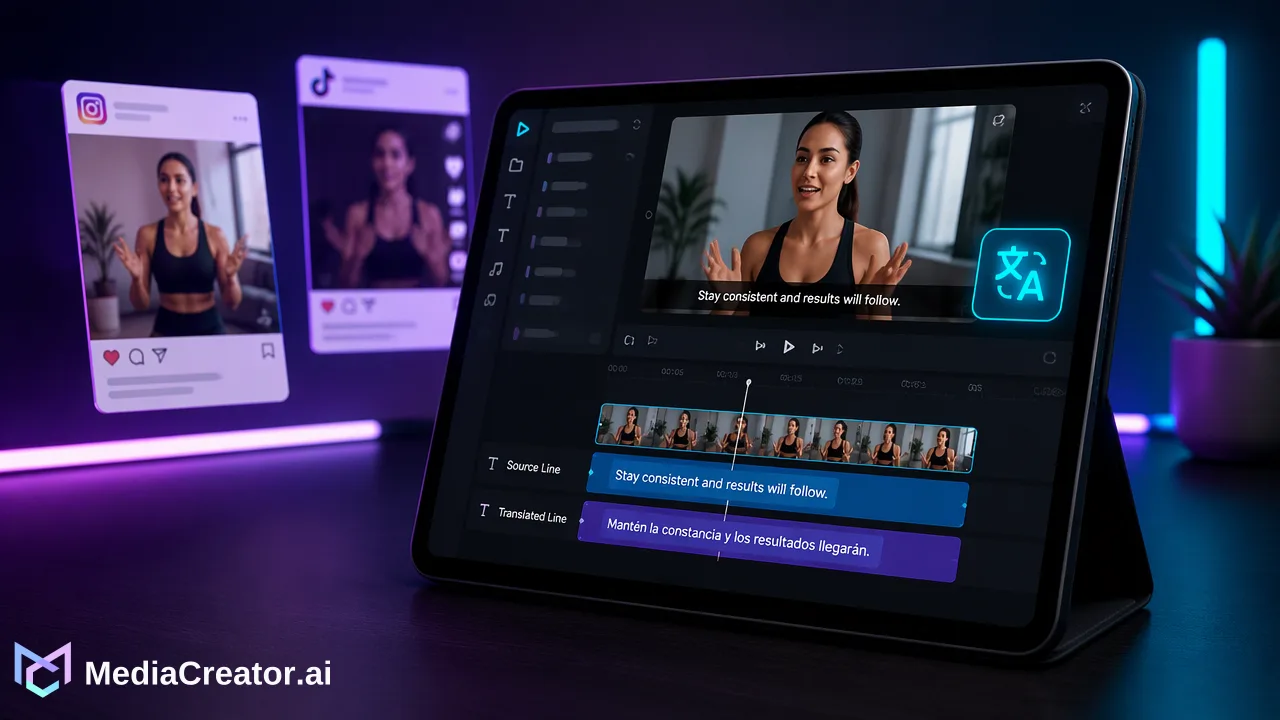
Correct terminology in source and translation lines, review the spoken result, and use a human language check before scheduling a dubbed video.
To fix AI video dubbing pronunciation, first identify whether the problem begins in the source speech, the recognized source line, the translated wording, or the generated voice. Correct the editable source and translation lines where the tool allows, regenerate or review the output, and listen to the full sentence in context. For a name or product term that still sounds wrong, use a human-reviewed recording or revise the script rather than assuming the tool has a pronunciation dictionary.
Find the exact point where AI video dubbing pronunciation changes
A short video can contain several different errors that sound alike to a viewer. A name may be misheard in the original audio, transliterated unexpectedly in the translation, or spoken awkwardly even when its written form is correct. Label the fault before editing. Compare the original spoken phrase with the source line, then compare that line with the translation and the generated voice. If a technical term is correct in text but the voice stresses the wrong syllable, rewriting unrelated translated lines will not address the real issue.
Use a small review table for each affected phrase: time in video, intended term, source line, translation line, and heard output. This is an editorial worksheet, not a claim about any app’s internal data fields. For a product name, include its approved spelling and how a native speaker should say it. For a SKU, decide whether each letter and number should be spoken separately. For jargon, write a plain-language explanation so a translator understands the concept before choosing a local term.
Do not treat every variation as a failure. A proper noun may have an accepted local pronunciation, while an exact product model identifier may need the same spoken sequence in every language. Set the standard before the team makes repeated changes. The question is whether a listener would identify the correct person, product, or instruction, not whether a synthetic voice imitates the original speaker perfectly.
Correct the source line before translating again
Start with the source. Listen to the original clip without the dub and check whether the speaker says the intended word clearly. If the source audio is clipped, buried under music, or ambiguous, an editor may need a clearer source recording. Editing a translation cannot fully repair an original instruction that is hard to hear. If the source line itself was recognized incorrectly, use the documented editable source lines in MediaCreator’s enabled Video Translation Pro workflow for supported uploaded videos. Correct the phrase while preserving its actual meaning and timing.
For example, if a fictional product name is recorded as “Aster Nine” but the source line reads “aster night,” the editor should correct the source line before judging the target-language version. This is an illustrative writing example, not a measured product result or a claim about automatic detection. Keep a short glossary of approved names and product terms outside the video tool. The glossary gives reviewers a shared reference, but it does not imply that the tool has a phonetic dictionary or a global term-lock feature.
After changing a source line, recheck nearby sentences. A name may be part of an instruction such as “choose the Aster Nine preset,” and changing only two words can leave a sentence that sounds grammatically odd. A person who knows the original message should confirm that the revised line still says what the speaker intended.
Edit translation lines for meaning and speakability
Next inspect the translation. MediaCreator’s AI video translation workflow supports editable source and translation lines for enabled uploaded-video translation. That makes it possible to correct a mistranslated name, SKU, or specialist phrase before the team accepts a rendered dub. Keep the original meaning, but consider how a line will sound when spoken at the pace of a short clip. A literal translation may be accurate on paper yet hard to understand when spoken quickly.
Make the smallest change that resolves the listener’s problem. Preserve protected names where the brand requires them. Translate a descriptive product category when a local audience needs that explanation. For a SKU, avoid changing the identifier while translating the words around it. If the spoken form is essential, give the reviewer a pronunciation note in the team’s editorial brief. Do not claim that entering special spelling will always control the voice; inspect the actual generated result.
A bilingual reviewer should compare the target line with the source meaning, not just proofread spelling. Ask whether the action, object, and qualifier survived the translation. If the original says “review the draft before scheduling,” a dub that says “publish the draft now” is unsafe even if every product name sounds perfect. This distinction keeps terminology repair from hiding a more consequential change in instructions.
Listen to the generated video in context
After editing, listen to the complete dubbed segment at normal playback speed. Do not approve a term from a single isolated word. Speech around the term determines whether it is understandable and whether it lands at the right moment in the video. Watch the corresponding picture while listening: a spoken product label that arrives after the product card disappears may confuse a viewer even if pronunciation is acceptable. Check the beginning and ending of the sentence for dropped words or unnatural pauses.
Use two passes. The first reviewer knows the source and checks meaning. The second reviewer should understand the target language and listens as a viewer would, ideally without reading the corrected text first. Ask them to write down the name or instruction they heard. If they cannot recover a critical term, treat the dub as unfinished. This is a suggested quality-control process, not a claim that MediaCreator supplies a two-person approval workflow.
If the sound remains unsuitable, revise the line and listen again. If repeated generation still cannot produce a clear critical name, consider recording a human voiceover or changing the script to include an explanatory phrase. A text caption can support comprehension, but it should not be used to excuse a spoken instruction that says the wrong product or action.
Check subtitles, post copy, and destination context separately
A dubbed spoken track, on-video subtitles, and a social post caption are different deliverables. Check each visible or audible version against the approved terminology. MediaCreator’s Quick Caption can assist with copy based on uploaded media, but that copy still needs human review and platform-specific adaptation. Do not assume the post caption automatically corrects a mistranslated audio track. Likewise, do not present standalone subtitle extraction or burn-in cards as live merely because they appear in a product interface; follow the current button state.
Before scheduling, inspect the final uploaded video, its selected language, its post copy, and its destination preview. A team may use MediaCreator’s social media scheduler to prepare a reviewed post for supported TikTok, Instagram, Facebook, or YouTube accounts. The reviewer should be able to point to the exact final asset and its approved language version. If a revision is made after review, listen to that new export rather than relying on the previous approval.
Keep a correction record containing the term, timecode, approved source wording, approved translation, reviewer, and final asset identifier. This lets future editors reuse the editorial decision without claiming a tool feature that has not been documented. It also prevents the team from publishing an older file whose text was fixed but whose audio was not.
A release test for high-risk words
Prioritize words whose mispronunciation could change what a viewer does: names in attribution, product model identifiers, safety qualifiers, dates, numbers, and instructions. For each, confirm the written source, translated meaning, spoken output, and timing in the final export. Lower-risk stylistic preferences can be noted for later improvements, but a wrong model number should stop the schedule until corrected.
The method is deliberately narrow: identify the failure layer, edit documented lines, regenerate, listen, and approve the specific final file. It avoids a common loop in which a team repeatedly reruns the entire video without knowing whether the source text, translation, or speech output caused the error. MediaCreator provides the editable line and video translation workflow; the editorial decision about a brand term remains with the team.
FAQ
How can teams tell whether a name is mistranslated or mispronounced?
Compare the source speech, editable source line, translation line, and final dubbed audio in that order. A wrong written line calls for text correction; a correct written line with unclear speech calls for listening and a different spoken solution.
Can teams set a guaranteed phonetic dictionary in MediaCreator?
The documented workflow includes editable source and translation lines, but it does not establish a phonetic dictionary or guaranteed pronunciation control. Review the rendered voice and choose another editorial treatment if a critical term remains unclear.
How can teams review a SKU across languages?
Keep the identifier unchanged where required, decide how its letters and numbers should be spoken, and have a target-language reviewer listen to the final segment in context.
Should a corrected caption replace audio review?
No. Post copy and dubbed speech serve different purposes. Check the final spoken instruction and the caption separately before scheduling.
Learn More
Choose the product information that fits the next step in your workflow.
Get Started with MediaCreator.ai
Discover the power of AI-driven content creation
Related Articles
Continue learning with these related guides
When to Label an AI-Generated TikTok Video Before Publishing
Review this actionable checklist to determine when to label AI generated TikTok videos for realistic media, synthetic voices, and third-party scheduling.
BlogUsing an AI Video Generator for Short Social Videos: From Prompt to Scheduled Post
A step-by-step workflow for making short clips with an AI video generator for social media, reviewing them, adding captions and scheduling the post.
BlogHow to Schedule YouTube Shorts in Advance
Prepare Shorts with strong titles and descriptions, schedule them on a calendar next to other platforms and preview before they go live.
Blog