
Building a Scalable Hashtag Library: A Workflow Guide for Multi-Account Management
Learn how to build a scalable social media hashtag library workflow to organize tags, adapt posts, and manage multiple accounts efficiently.
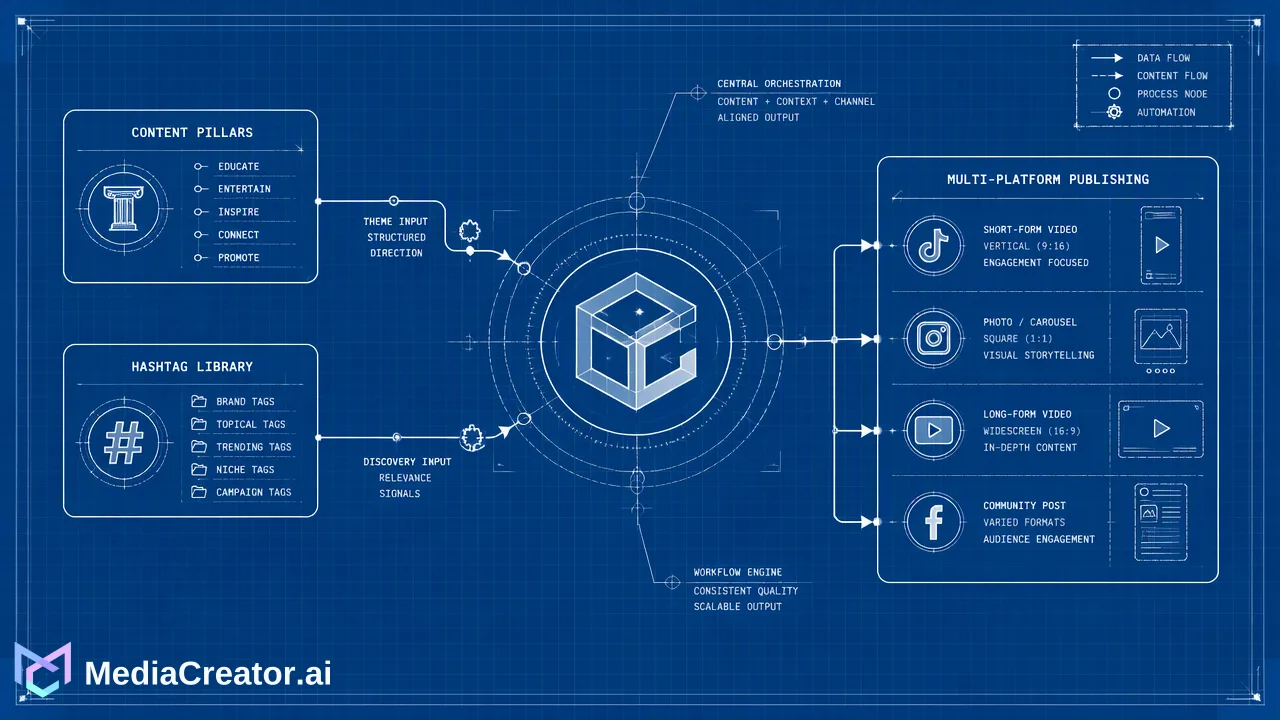
Learn how to transition from manual hashtag tracking to a centralized social media hashtag library workflow. Discover how organizing tags by content pillar and adapting them per platform supports faster scheduling and consistent branding.
Managing hashtags in scattered notes or documents is unsustainable for professional social media managers. Centralizing your hashtags into a dynamic, organized library within your publishing dashboard helps you quickly adapt content for different platforms, maintain brand consistency, and significantly reduce the time spent in the content composer. Moving away from manual copy-pasting toward a unified social media hashtag library workflow supports faster scheduling and keeps multi-account management organized.
The Hidden Cost of Fragmented Hashtag Management
When managing multiple brands across TikTok, Instagram, Facebook, and YouTube, relying on disparate documents, spreadsheets, or personal notes creates immediate bottlenecks. Manual hashtag management leads to time-consuming copy-pasting and increases the risk of brand inconsistency. Social media managers often find themselves searching through outdated text files to find the right tags for a specific campaign, which slows down the entire publishing cycle. Scaling across multiple brands requires a more robust, centralized approach. Managing multiple accounts per supported platform multiplies the complexity of manual tracking. Without a unified system, teams struggle to maintain visibility over which hashtags are being used for which content pillars, leading to repetitive or irrelevant tagging. Transitioning to a centralized workflow keeps work in one place and reduces the manual switching between drafting tools and publishing platforms.
Structuring Your Hashtag Library for Scalability
A scalable hashtag library requires logical categorization rather than a single, massive list of tags. To build an effective system, organize hashtags by content pillars to maintain thematic relevance, and differentiate hashtag sets based on platform-specific requirements.
| Workflow Approach | Hashtag Organization | Platform Adaptation |
|---|---|---|
| Manual Notes | Scattered across documents; prone to version control issues. | Requires manual copy-pasting and switching between apps. |
| Centralized Library | Grouped logically by content pillar and campaign. | Applied directly within the composer and adapted per platform. |
| TikTok and Instagram have different tagging cultures and character limits. A centralized library helps teams group tags specifically for TikTok's discovery-driven format versus Instagram's community-focused tagging. By structuring tags around distinct content pillars—such as product launches, educational tips, or user-generated content—social media managers can quickly pull the most relevant group for a specific post. This structured approach supports faster drafting and ensures that the tags applied align with the broader social media content strategy. |
Integrating Hashtags into Your Publishing Workflow
Connecting a hashtag library directly to your publishing process reduces the friction of moving between separate apps. MediaCreator.ai allows you to connect TikTok, Instagram, Facebook, and YouTube in one dashboard using OAuth 2.0 account connections, requiring no password sharing or browser extensions. Within this unified dashboard, users can compose posts once and adapt them per platform, including specific hashtag adjustments, directly in the composer.
The Centralized Drafting Process
- Drafting: Use the composer to write the core message. Optional tools like Nova AI can assist as a co-pilot for post drafting, while Quick Caption can help generate platform-adapted copy based on uploaded media. If using AI write actions, the platform displays a confirm card before publishing, keeping you in full control of the final output.
- Adapting: Apply the relevant hashtag groups from your library. Adjust the selection for each specific platform to match character limits and audience expectations.
- Previewing: Leverage per-platform previews to verify that hashtag placement and formatting render correctly before scheduling.
- Scheduling: Move the adapted posts to the visual calendar, which tracks draft, queued, and published states. Maintaining a dynamic library that evolves with your content strategy, rather than relying on static, permanent sets, is crucial here. As campaigns shift, updating the library within the platform ensures that all connected accounts have access to the most current tags.
Maintaining Brand Consistency at Scale
Centralized libraries help teams apply brand-specific hashtags consistently across all campaigns and connected accounts. When managing multiple accounts per supported platform, consistency becomes a major operational challenge. A unified social media hashtag library workflow reduces guesswork for team members, helping teams avoid accidentally omitting mandatory campaign tags or branded identifiers. Organized management supports faster scheduling and more efficient content production cycles. By keeping the hashtag library integrated with the visual calendar and unified inbox, teams maintain full context over their social operations. This centralized visibility helps social media managers measure the effectiveness of their content cycles and adapt their hashtag groupings for future posts, supporting a continuous loop of workflow improvement.
FAQ
How often should I update my hashtag library?
A hashtag library should be a dynamic resource rather than a static list. Update your library whenever you launch new campaigns, introduce new content pillars, or notice shifts in platform trends. Regular reviews help maintain thematic relevance and ensure your social media content strategy remains aligned with current brand goals.
Should I use the same hashtags for TikTok and Instagram?
No, it is best to differentiate hashtag sets based on platform-specific requirements. TikTok and Instagram have different formatting norms, character limits, and user behaviors. A unified publishing dashboard helps you compose a post once and adapt the hashtags specifically for TikTok, Instagram, Facebook, or YouTube before publishing.
How does a unified dashboard help with hashtag management?
A unified dashboard centralizes your workflow, reducing the need to copy and paste from scattered notes. Platforms like MediaCreator.ai support managing multiple accounts, applying organized hashtag groups during the drafting phase, and using per-platform previews to check formatting. This reduces time spent in the composer and supports consistent branding across all connected accounts.
Get Started with MediaCreator.ai
Discover the power of AI-driven content creation
Related Articles
Continue learning with these related guides
How to Optimize Your Facebook Business Page for Professional Social Media Management
Learn how facebook business page optimization helps teams manage brand presence, collaborate securely via OAuth, and streamline cross-platform publishing.
BlogMastering LinkedIn Consistency: A Workflow Guide to Automated Scheduling
Streamline your scheduling workflow by shifting from manual daily posts to batch planning, visual calendars, and multi-platform management.
Blog