
How to Build a Centralized Hashtag Library for Multi-Account Social Media Management
Learn how to build a centralized social media hashtag library to streamline multi-account publishing, reduce manual work, and maintain brand consistency.
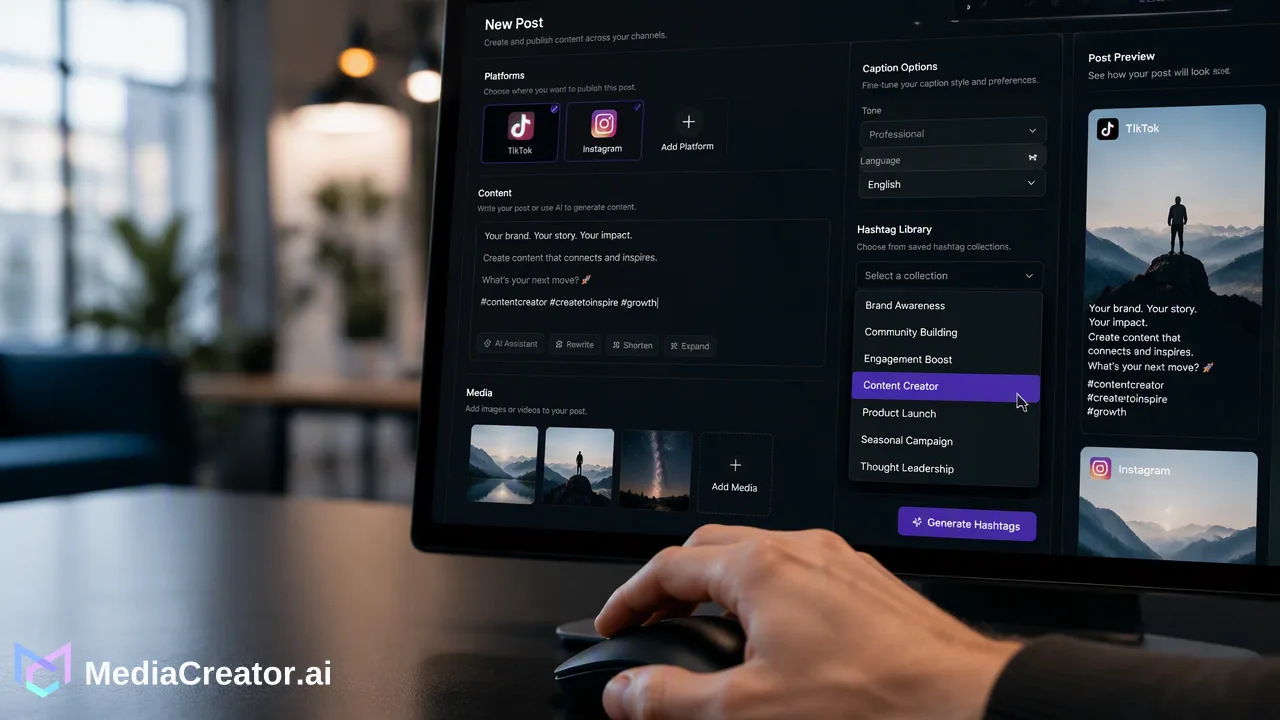
Learn how to transition from fragmented notes to a centralized hashtag library within a unified social media management platform to streamline publishing and maintain brand consistency.
Managing hashtags in scattered notes or documents creates bottlenecks that hinder scaling. Effective social media hashtag library management requires moving away from fragmented storage and centralizing your assets within a unified social media management platform. By building a structured library, teams can categorize hashtags by campaign or niche, maintain brand consistency across multiple accounts, and drastically reduce the manual copy-paste work required for multi-platform publishing. Centralizing these assets helps social media managers and agencies streamline their daily workflows, allowing them to compose content once and adapt it efficiently for different audiences.
The Hidden Cost of Fragmented Hashtag Management
Many social media managers and small teams begin by storing hashtags in generic notes apps, spreadsheets, or shared documents. While this approach works for a single account, it quickly becomes a bottleneck when scaling operations across multiple brands and platforms. Fragmented storage leads to operational inefficiency and inconsistent branding. When team members have to constantly switch between a document and a publishing interface, the risk of using outdated or incorrect tags increases. Manual copy-pasting is a significant bottleneck for multi-account management. Every time a post is drafted, operators must hunt for the right document, find the specific cluster of tags for that campaign, copy them, and paste them into the social platform. This repetitive manual work consumes valuable time that could be spent on content strategy or community engagement. Furthermore, disconnected documents make it difficult to update hashtag strategies collaboratively. If a campaign shifts or a new trending tag emerges, updating a static document does not automatically reflect in the team's daily publishing workflow, leaving room for errors and misaligned messaging.
Structuring Your Hashtag Library for Scalability
Transitioning from ad-hoc notes to a structured library requires a clear methodology for categorization. A centralized repository should organize hashtags in a way that makes them instantly retrievable during the content creation process. To build an effective library, organize your hashtags by platform, campaign, or specific niche. For example, a studio managing multiple brands might create distinct groups for product launches, evergreen industry terms, and localized event tags. It is important to maintain a balance between consistent core tags and flexible, platform-specific tags. Core tags represent the brand identity and are used across most communications. Flexible tags are adapted based on the specific network or current trends.
| Category Type | Purpose | Example Use Case |
|---|---|---|
| Core Brand | Maintains consistent brand identity | Company name, primary tagline |
| Campaign-Specific | Tracks specific marketing initiatives | Product launches, seasonal events |
| Niche/Industry | Connects with broader community topics | #SocialMediaManagement, #ContentCreation |
| Platform-Specific | Aligns with network-specific trends | TikTok challenges, YouTube Shorts tags |
| By structuring assets into these clear categories, teams can quickly select the appropriate mix of tags for any given post, ensuring that the content is both on-brand and optimized for the specific audience they are trying to reach. |
Integrating Hashtags into Your Publishing Workflow
A structured library is most effective when it is directly integrated into the tools used to schedule and publish content. MediaCreator.ai provides a unified dashboard that connects supported social accounts through OAuth 2.0—requiring no password sharing or browser extensions—allowing teams to manage multiple accounts per supported platform from one place. When composing a post, users can leverage the dashboard to draft content once and adapt it for TikTok, Instagram, Facebook, and YouTube. Instead of toggling between a notes app and the scheduler, teams can insert their categorized hashtags directly into the composer. MediaCreator.ai features visual calendars with draft, queued, and published states, enabling users to preview posts and ensure hashtag placement is formatted correctly for each specific platform before publishing. Additionally, optional AI-assisted tools can support the drafting process. Quick Caption can generate platform-adapted copy based on uploaded media, while Nova AI acts as a co-pilot for post drafting and workflow assistance. When using these tools to refine captions or suggest relevant tags, MediaCreator.ai ensures human oversight by requiring a confirm card before any AI write action is published. This keeps the workflow efficient while maintaining strict control over the final output.
Scaling Your Social Strategy with a Unified Dashboard
Moving away from fragmented documents to a centralized asset management system fundamentally changes how teams handle daily publishing. Centralized asset management reduces repetitive manual work, freeing up social media managers to focus on strategy, community interaction, and creative development. A unified workflow allows for faster content creation and a more consistent brand presence across all channels. When hashtags, media, and copy are managed in the same environment, the friction of multi-account management is significantly reduced. Teams can seamlessly move from drafting a post in the Content Studio to scheduling it on the visual calendar, confident that the correct campaign tags are applied. Beyond publishing, keeping operations in one platform supports better overall account management. With a unified inbox bringing comments, direct messages, and mentions from connected accounts into one place, teams can monitor the conversations generated by their targeted hashtags and reply without leaving the dashboard. Ultimately, integrating your hashtag library into a comprehensive social media management platform supports a more organized, scalable, and professional content operation.
FAQ
Why is a centralized hashtag library better than a notes app?
Managing hashtags in a notes app requires constant manual copy-pasting and switching between applications, which creates bottlenecks for multi-account management. A centralized library integrated into a social media management platform reduces this repetitive work, minimizes the risk of using outdated tags, and helps maintain brand consistency across campaigns.
How do I organize hashtags for different social media platforms?
The most effective approach is to categorize hashtags by platform, campaign, or niche. Maintain a core set of consistent brand tags, and combine them with flexible, platform-specific tags tailored to the formats and audiences of networks like TikTok, Instagram, Facebook, and YouTube.
Can I use AI to help manage my hashtag strategy?
Yes, AI tools can assist in drafting and adapting content. In platforms like MediaCreator.ai, optional tools such as Quick Caption and Nova AI help generate platform-adapted copy and suggest relevant tags based on your media. To ensure quality and brand alignment, AI write actions always display a confirm card for human review before publishing.
Get Started with MediaCreator.ai
Discover the power of AI-driven content creation
Related Articles
Continue learning with these related guides
How to Optimize Your Facebook Business Page for Professional Social Media Management
Learn how facebook business page optimization helps teams manage brand presence, collaborate securely via OAuth, and streamline cross-platform publishing.
BlogMastering LinkedIn Consistency: A Workflow Guide to Automated Scheduling
Streamline your scheduling workflow by shifting from manual daily posts to batch planning, visual calendars, and multi-platform management.
Blog