
The Social-First Distribution Framework: How to Repurpose Assets for Maximum Reach
Build an efficient social media content distribution strategy by repurposing core assets into platform-native formats with centralized scheduling.
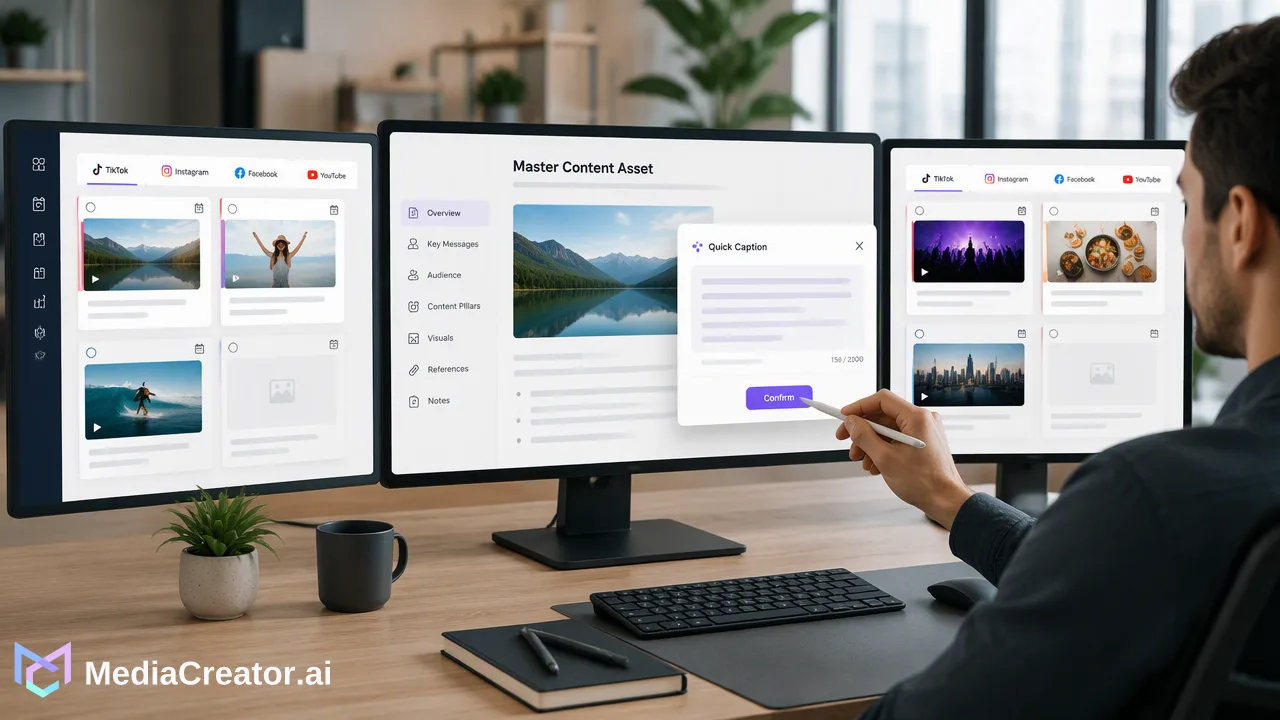
A social-first distribution framework repurposes core assets into platform-native formats across TikTok, Instagram, Facebook, and YouTube to build reach efficiently.
A social-first distribution framework maximizes reach by repurposing core assets into platform-native formats rather than duplicating identical posts across channels. An effective social media content distribution strategy adapts messaging, media dimensions, and tone to fit the distinct user behaviors of platforms like TikTok, Instagram, Facebook, and YouTube. By coordinating distribution through a centralized management dashboard and visual calendar, teams maintain consistent brand guidelines while adjusting copy and creative for each audience.
The Core of Social-First Distribution
Content distribution traditionally relies on three primary channel categories: owned channels (such as brand social profiles, websites, and email lists), earned channels (including organic shares, mentions, and press coverage), and paid channels (such as sponsored placements and advertising campaigns). A modern social media content distribution strategy uses owned social profiles as the testing and distribution hub to fuel earned visibility and inform paid amplification. Broadcasting identical assets across every network often fails because audience expectations differ widely between networks. A community on TikTok expects quick, vertical video hooks, whereas subscribers on YouTube look for comprehensive, high-resolution presentations. When teams broadcast generic links or uniform creative everywhere, audience engagement usually drops. A social-first repurposing framework addresses this challenge by deconstructing one comprehensive asset—such as a product announcement, long-form webinar, or research report—into modular components. Instead of producing independent creative projects for every single platform, teams produce a single authoritative asset and adapt its core insights into native formats. This repurposing workflow saves production hours while ensuring that every post feels purpose-built for the destination feed.
Mapping Content Formats to Native Platform Behaviors
Repurposing assets effectively requires mapping core content elements to the technical requirements and interaction habits of each supported network. MediaCreator.ai connects directly to TikTok, Instagram, Facebook, and YouTube via OAuth 2.0, allowing creators and marketing teams to configure platform-tailored variations without handling shared passwords or separate browser extensions. | Platform | Primary Asset Formats | Native Interaction Focus | | :--- | :--- | :--- | | TikTok | Short vertical video, on-screen text, trending audio hooks | Fast discovery, immediate pacing, informal visual delivery | | Instagram | Carousels, vertical video (Reels), square image updates | Visual aesthetics, narrative captions, community comments | | Facebook | Horizontal or square video, image links, community discussions | In-depth commentary, conversational sharing, external links | | YouTube | Long-form video, episodic series, detailed descriptions | Search discovery, structured video metadata, reference viewing | Adapting content manually for multiple networks can create editorial bottlenecks. Teams can use optional AI assistance to support this workflow. For example, Quick Caption in MediaCreator.ai helps generate platform-adapted copy from uploaded creative assets, while Content Studio assists in generating still images or video drafts from creative prompts. Because automated writing must never compromise brand reputation, AI write actions require a confirmation step before any drafted post moves forward, ensuring human editorial oversight remains intact.
Centralizing the Distribution Workflow
Publishing across multiple accounts on different networks introduces operational friction when managed through disconnected tabs and native mobile apps. MediaCreator.ai streamlines multi-channel operations by providing a centralized dashboard where teams can connect multiple accounts per platform. Within the visual calendar interface, teams compose an initial master post and adapt it for each channel simultaneously. Operators can inspect dedicated per-platform previews to verify how copy breaks, hashtags, and media aspect ratios render on TikTok, Instagram, Facebook, and YouTube before queueing the post. The visual calendar clearly categorizes content by draft, queued, and published states, giving content managers complete control over publishing schedules across weeks or months. To keep distributed content cohesive, teams can store a standardized tone in Brand Voice. This keeps AI-assisted drafts and multi-author copy aligned with brand guidelines across every channel. Additionally, managing shared destination URLs in one centralized link management workspace keeps outbound campaign tracking orderly across all scheduled posts.
Measuring Impact to Refine Asset Creation
A sustainable social media content distribution strategy does not end once an asset is published. Closing the loop between distribution and future asset production requires tracking platform responses and evaluating engagement data. MediaCreator.ai features a unified social inbox that gathers incoming comments, direct messages, and @mentions across connected profiles. Reviewing community discussions in one central workspace gives content teams qualitative insight into what topics, questions, or objections arise from published materials. These incoming conversations provide raw material for future content assets. Simultaneously, web app analytics allow teams to evaluate per-account and per-post performance across connected networks. Reviewing distribution metrics alongside posting-time recommendations informs future calendar planning, helping teams identify which content formats perform best on specific days or time windows. By applying these quantitative and qualitative insights, teams continuously improve how they repurpose core assets into high-reach, platform-native campaigns.
FAQ
What is the difference between cross-posting and social-first repurposing?
Cross-posting broadcasts the exact same image, video, or caption across multiple social networks simultaneously without modifying formatting or tone. In contrast, social-first repurposing takes a central content asset—such as a long-form video or case study—and restructures it into platform-native formats. This means reformatting vertical video for TikTok or Instagram Reels, adjusting caption lengths, framing conversational discussions for Facebook, and creating tailored descriptions for YouTube.
How can AI tools assist in maintaining brand consistency across different networks?
AI writing and creation tools support content teams by drafting platform-tailored copy while adhering to established tone guidelines. Within MediaCreator.ai, features like Brand Voice store predefined style rules so that tools like Quick Caption can generate channel-specific drafts that align with brand standards. Furthermore, AI write actions use a confirm-first workflow, requiring human review before anything is placed on the schedule.
Why is a centralized content calendar essential for multi-channel distribution?
A centralized calendar gives teams clear visibility across all connected profiles, organizing posts by draft, queued, and published states. This visibility prevents scheduling conflicts, helps teams balance distribution across owned channels, and ensures that cross-platform campaigns align with strategic launch dates.
Learn More
Choose the product information that fits the next step in your workflow.
Get Started with MediaCreator.ai
Discover the power of AI-driven content creation
Related Articles
Continue learning with these related guides
Building a Human-in-the-Loop AI Workflow: A Practical Guide
Learn how to build a scalable, human-in-the-loop AI content workflow that protects brand voice, streamlines drafting, and maintains editorial oversight.
BlogPredictive Media Intelligence: A Workflow Guide for Proactive Social Strategy
Learn how a predictive media intelligence workflow helps teams spot conversation trends early, manage brand risk, and plan social content proactively.
Blog