
How to Build a Scalable Social Media Content Calendar for 2026
Learn how to build a scalable social media content calendar workflow with per-platform previews, asset organization, and AI assistance.
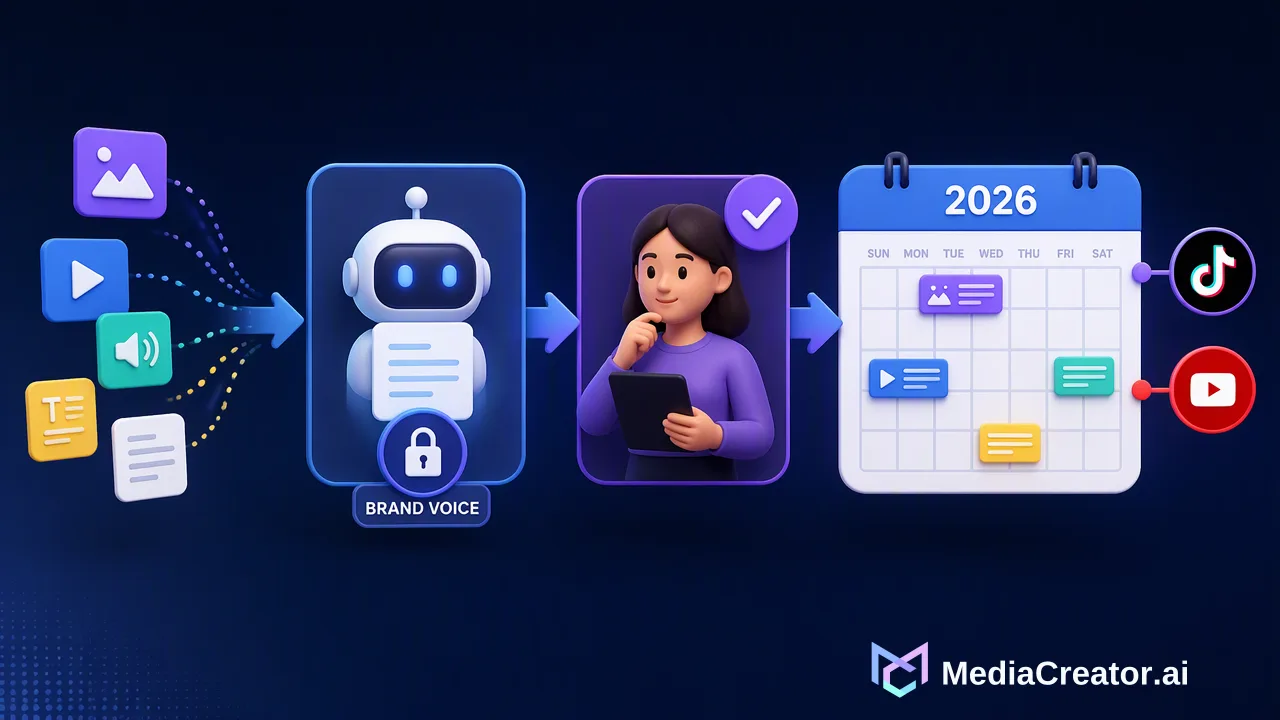
Build a scalable social media content calendar workflow for 2026 by combining strategic planning, platform-specific previews, centralized asset management, and governed AI drafting.
A scalable social media content calendar workflow moves teams from reactive daily posting to a structured, repeatable publishing operation. Rather than treating a calendar as a basic list of dates, a modern social workflow centralizes creative assets, standardizes approval statuses, adapts copy for specific social networks, and incorporates per-platform previews before content goes live. With built-in brand voice controls and human review checkpoints for AI assistance, organizations can maintain consistent publishing cadences across TikTok, Instagram, Facebook, and YouTube without compromising editorial standards.
The Shift from Reactive Posting to Strategic Calendars
Publishing social media updates ad hoc creates operational friction, inconsistent brand presentation, and gaps in communication. A structured social media content calendar workflow establishes a predictable operating cadence, giving marketing teams, studios, and agencies visibility into upcoming output weeks in advance. A clear distinction exists between a general marketing content calendar and a platform-specific social media calendar. General marketing calendars track broad promotional campaigns, product launches, email sends, and editorial milestones. In contrast, a social media calendar translates those high-level priorities into operational assets tailored to specific social networks. Instead of treating social distribution as an afterthought, an effective calendar workflow aligns individual posts with core business objectives, mapping every asset to a defined audience initiative rather than merely filling calendar slots.
Essential Components of a Scalable Social Media Calendar
To support multi-channel publishing without miscommunication, every entry within a social media calendar workflow requires standard metadata and asset management. | Component | Operational Role | Calendar Function | | :--- | :--- | :--- | | Platform Copy | Network-specific text, hashtags, and mentions | Tailors tone and format for individual network conventions | | Media Assets | High-resolution video and image files | Links centralized library assets directly to scheduled entries | | Publication Status | Lifecycle tracking (Draft, Queued, Published) | Clarifies current state across internal collaborators | | Campaign Tracking | Link management and tracking parameters | Organizes outbound URLs in a unified location for reporting | | Network Previews | Per-channel rendering checks | Displays layout and formatting prior to queueing | Standardizing these components helps teams organize creative assets, promotional links, and approval statuses before a post enters the scheduling pipeline.
Scaling Content Production with AI and Brand Voice Controls
Increasing publishing volume across multiple channels can stretch creative resources. Integrating AI creation tools into the content calendar workflow can assist with routine drafting and asset generation, provided teams implement strict brand controls. MediaCreator.ai incorporates optional tools such as Quick Caption to produce platform-adapted copy from uploaded media, and Content Studio to generate supporting still images from text prompts and reference images. To prevent generic output, teams can configure Brand Voice settings, which store reusable tone guidelines that AI generation features reference during composition. Maintaining governance requires safeguards against automated publishing errors. Within this workflow, AI write actions use a confirm-first model: the platform displays a confirm card requiring manual review before any drafted post can transition to a scheduled or queued state. This approach keeps human editors in control of final messaging while accelerating preliminary drafting.
Platform-Specific Formatting and Visual Preview Workflows
Content that performs well on one network cannot simply be copied and pasted to another without adjustments. Different networks enforce distinct technical constraints, such as differing caption truncation thresholds, video framing boundaries, and hashtag treatments. MediaCreator.ai supports publishing across TikTok, Instagram, Facebook, and YouTube via OAuth 2.0 connections without requiring browser extensions or password sharing. Because multiple accounts can be connected per platform, teams must verify how each post appears across every targeted destination. Using a cross-platform publishing calendar that provides a per-platform preview allows creators to evaluate exact visual rendering, caption cutoffs, and media framing for each network before placing the post into the schedule.
Scheduling Execution with Visual Statuses and Analytics
A functional calendar workflow must clearly communicate publishing states across team members. MediaCreator.ai organizes scheduled items on a visual calendar divided into three distinct operational states: draft, queued, and published. - Draft: Work in progress where copy, media assets, and tags are being assembled or refined. - Queued: Finalized posts that have received editorial review, confirmed platform previews, and an assigned publish time. - Published: Successfully distributed posts accessible for performance analysis. To optimize scheduling windows, teams can review in-app analytics and best-time recommendations. Rather than guessing when audiences are most likely to encounter content, planners can use account-level performance signals to inform post timing across connected TikTok, Instagram, Facebook, and YouTube accounts.
FAQ
How do teams maintain brand consistency when using AI in a social media calendar?
Teams maintain brand consistency by defining reusable tone profiles, such as Brand Voice settings, that guide AI writing tools during caption generation. In addition, implementing mandatory review workflows—where AI write actions display a confirm card before any post moves to a queued or published state—supports editorial quality and prevents unreviewed content from publishing automatically.
Why are per-platform previews necessary in a publishing calendar?
Each social network renders aspect ratios, caption lengths, hashtags, and interactive elements differently. Generating dedicated previews for TikTok, Instagram, Facebook, and YouTube helps teams detect truncation, layout issues, or media cropping errors while posts remain in draft status, well before publishing occurs.
How can marketing teams transition from reactive posting to structured scheduling?
Marketing teams transition away from reactive posting by separating high-level campaign themes from execution, establishing a visual calendar with distinct draft, queued, and published stages, and scheduling posts around account performance data and best-time recommendations.
Learn More
Choose the product information that fits the next step in your workflow.
Get Started with MediaCreator.ai
Discover the power of AI-driven content creation
Related Articles
Continue learning with these related guides
Mastering Social Media Algorithms: A Workflow Guide for Algorithmic Optimization
Learn how a structured social media algorithm optimization workflow helps teams adapt content, schedule posts, and review cross-platform analytics.
BlogBuilding a Unified Social Media Measurement Framework: From Data to Business Impact
Build a unified social media measurement framework to connect cross-channel analytics with business impact, marketing KPIs, and measurable ROI.
Blog