
How to Build a Strategic Link-in-Bio Page for Social Media Channels
Discover how a structured link-in-bio strategy helps teams organize destinations, maintain brand consistency, and evaluate traffic from social profiles.
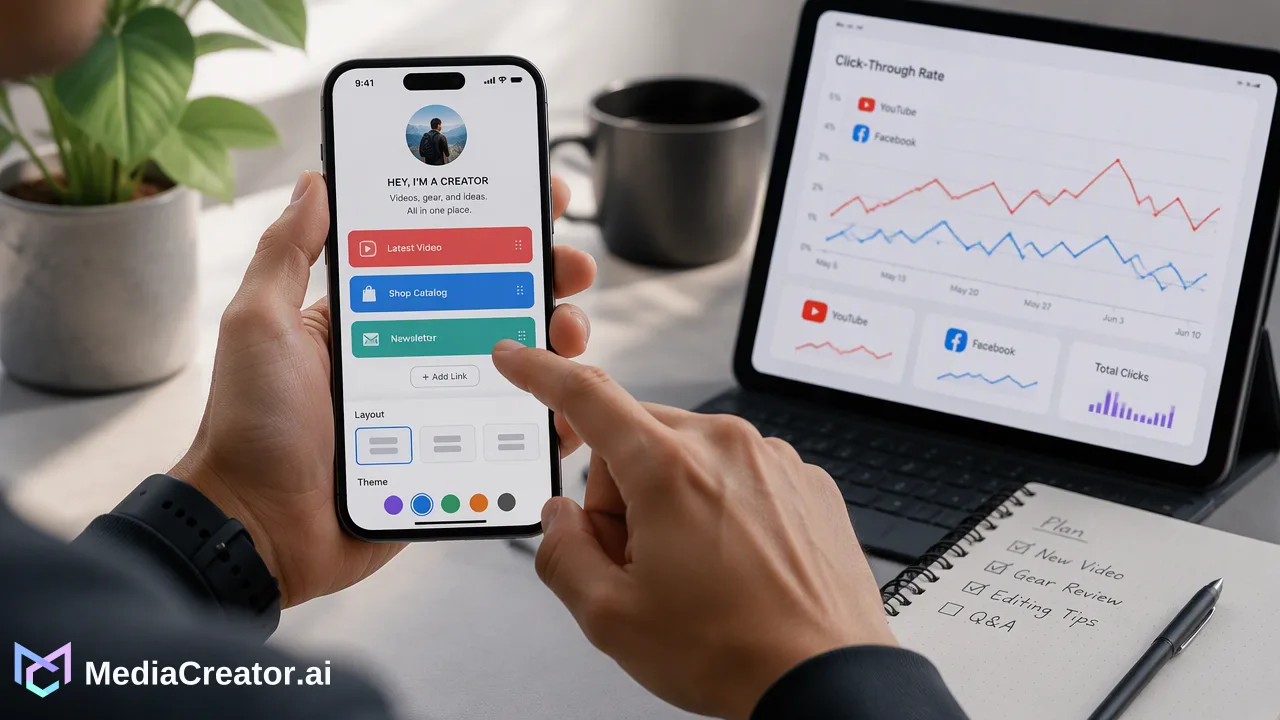
Learn how to build an effective link-in-bio page that connects social engagement to owned destinations using link organization, consistent branding, and post analytics.
A link-in-bio strategy provides a single, organized landing destination that bridges restricted outbound linking on social platforms with external websites, articles, and product catalogs. By aggregating key destinations into one accessible hub, teams can direct visitors from networks such as TikTok, Instagram, Facebook, and YouTube toward high-priority resources while maintaining consistent brand messaging and monitoring post performance.
The Strategic Role of the Link-in-Bio Landing Page
Major social networks, including TikTok, Instagram, Facebook, and YouTube, emphasize in-app retention and frequently restrict live, clickable hyperlinks within standard video or image captions. Consequently, a profile biography often serves as the solitary location where accounts can display an active outbound hyperlink. Treating the profile link as a single static web page limits flexibility, especially when publishing multiple campaigns simultaneously. A dedicated link-in-bio page functions as an adaptive traffic router. Instead of forcing teams to swap URLs every time a new video or campaign is released, a central landing page offers visitors immediate access to current campaigns, core service pages, and fresh content assets. Centralizing shared links within a single management workflow helps teams keep track of outbound destinations across channels. When campaigns conclude or destinations change, updating links in one organized inventory reduces broken redirects and keeps cross-platform audiences aligned with active initiatives.
Prioritizing Destinations for High-Intent User Journeys
When a visitor navigates away from a social feed to a profile bio, their attention span is limited. Presenting dozens of unorganized options can introduce friction and cause drop-offs. A structured hierarchy guides users toward intended goals effectively. To structure destinations systematically, consider categorizing links by user intent:
| Destination Tier | Purpose | Recommended Placement |
|---|---|---|
| Primary Actions | Core conversion goals (e.g., product trials, event registration) | Top of page with high-contrast formatting |
| Timely Content | Featured posts, recent video resources, active announcements | Mid-tier cards directly below primary goals |
| Evergreen Links | Support documentation, company overview, secondary social channels | Lower section or compact list elements |
| Using centralized link management allows social teams to store shortened and shared links in one place. This operational visibility makes it straightforward to reorder buttons, swap promotional links, and archive outdated URLs without editing individual social profile bios manually across different networks. |
Maintaining Brand Consistency Across Social-to-Web Transitions
A disconnect between the creative style of a social feed and the appearance of the destination page can disorient visitors. If an audience member taps a link in an Instagram or TikTok bio and lands on an unfamiliar interface, trust can diminish. Cohesive design requires visual and linguistic alignment. The color palette, button styling, typography, and logo on the landing page should reflect the assets featured in the publishing stream. Visual consistency signals to the user that they remain in an official brand environment. Linguistic cohesion is equally critical. When teams maintain a documented Brand Voice, the copy across social captions, calls to action, and landing page buttons speaks with a unified tone. Setting a reusable voice standard supports consistency whether drafting promotional captions or labeling bio buttons, ensuring the messaging journey feels seamless from feed to destination.
Designing Mobile-First Layouts for Social Audiences
The vast majority of social media browsing occurs on smartphones. A link-in-bio page that functions adequately on a desktop browser may create severe navigation barriers if it is not specifically tailored for mobile viewports. Mobile-first landing page design should incorporate clear visual principles:
- Touch-Friendly Touchpoints: Buttons must feature sufficient padding and vertical spacing to prevent accidental mis-taps on smaller screens. - Direct Visual Hierarchy: High-priority destinations should appear above the digital fold so visitors do not have to scroll repeatedly to find primary links. - Minimal Visual Clutter: Excessive animations, heavy scripts, and intrusive banners slow mobile loading speeds and distract from the primary links. - Readable Typography: Font sizes must remain legible on compact displays without requiring manual zooming. When teams preview post rendering per platform before publishing to connected accounts such as TikTok, Instagram, Facebook, and YouTube, they can also align caption prompts with how the bio link appears on mobile screens.
Using Performance Analytics to Refine Outbound Strategy
An effective bio link strategy relies on active measurement rather than static assumptions. Audience interests change based on publishing schedules, campaign launches, and seasonal trends. Reviewing per-account and per-post performance across connected profiles provides actionable signals regarding what topics resonate with followers. If specific video formats or discussion themes generate high interaction on TikTok or Facebook, teams can update their link hub to highlight corresponding landing pages. Similarly, post-level analytics and scheduling data help marketing teams coordinate bio destination changes directly with the publishing calendar. By evaluating account-level engagement trends, teams can determine whether specific platforms drive audiences with different informational needs. For example, a YouTube audience may prefer in-depth technical documentation, whereas an Instagram audience might engage more with visual product launches. Aligning the bio hub with these performance signals supports continuous optimization of the social media funnel.
FAQ
Why do social media workflows require a dedicated link-in-bio landing hub?
Most social networks restrict clickable hyperlinks within standard post captions or comment sections to keep users inside their applications. A link-in-bio page creates an external destination accessible from profile bios, giving audiences a structured path to explore resources without requiring frequent bio updates for every new post.
How can teams organize links to support visitor navigation?
Teams can organize links by placing primary business goals—such as product catalogs, priority announcements, or registration forms—at the top of the hierarchy, followed by secondary content links such as recent articles or support documentation. Keeping shortened and shared links in a centralized system helps teams manage destination order without manual errors.
How do social post analytics inform bio link updates?
Reviewing per-account and per-post performance helps teams identify which platforms, post formats, and topics generate active interest. These signals provide context on what visitors expect to find when clicking through to the bio, informing how teams order and update destinations on the landing page.
Learn More
Choose the product information that fits the next step in your workflow.
Get Started with MediaCreator.ai
Discover the power of AI-driven content creation
Related Articles
Continue learning with these related guides
Building a Proactive AI Social Listening Workflow: Turning Insights into Strategic Action
Learn how to build a proactive AI social listening workflow to centralize conversations, analyze post performance, and guide your social media strategy.
BlogBeyond Social Listening: How to Build an Audience Intelligence Workflow
Move beyond reactive social listening. Learn how to build an audience intelligence workflow to turn engagement data into an informed content strategy.
Blog