
How to Cross-Post Short Videos to TikTok, Reels and Shorts Without Looking Duplicated
Adapt one vertical video for TikTok, Instagram Reels and YouTube Shorts: clean exports, per-platform captions, previews and a staggered schedule.
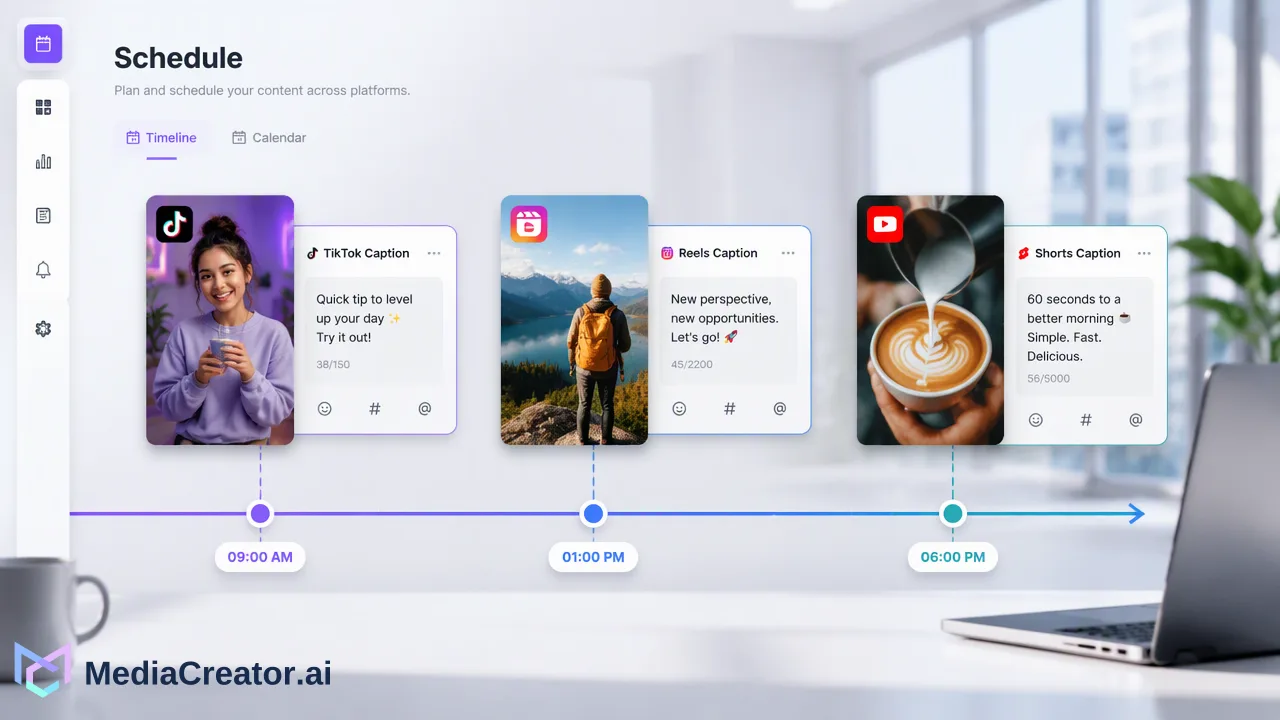
A practical workflow for turning one vertical video into three native-feeling posts on TikTok, Instagram Reels and YouTube Shorts.
To cross-post short videos to TikTok, Reels and Shorts, export one clean vertical master without any platform watermark, then create three versions of the post with their own caption, title and settings, preview each one and schedule them at staggered times. All three platforms say they limit recommendations for reposted content that carries another platform's watermark, so the file you upload matters as much as the caption. The goal is one piece of footage that reads as a native post in each feed, not the same post pasted three times.
What cross-posting short videos to TikTok, Reels and Shorts actually involves
Cross-posting is often described as uploading the same file everywhere. In practice it has three layers, and most guides only cover the first:
- The file. One vertical master that each platform accepts and that carries no other platform's branding.
- The post. Caption, title, hashtags, cover and settings written for the norms of each feed.
- The timing. When each version goes live, so the three uploads do not compete with each other or arrive at the same minute for followers who use all three apps.
The platforms are explicit about the first layer. TikTok's For You feed eligibility standards list reused content without new or creative edits, including content with another creator's visible watermark or superimposed logo, as ineligible for recommendation. Instagram's guidance on original content says that adding a watermark is not a material edit, and its recommendations page lists content mostly repurposed from another source among the things it avoids recommending. Downloading a finished TikTok and re-uploading it to Reels therefore works against you before anyone reads the caption.
Step 1: Export one clean vertical master
Edit the video once in your editing tool and export the master file before any platform touches it. A 9:16 frame at 1080 × 1920 is the common denominator for the three feeds.
Check length against the strictest destination. YouTube's help center on three-minute Shorts explains that videos up to three minutes count as Shorts when they use a square or vertical frame, so a vertical master of three minutes or less fits the Shorts shelf. A master that stays within that ceiling also fits TikTok and Reels without recutting.
Before exporting, confirm three things:
- Safe zones. Keep key text and faces away from the bottom and right edges, where each app overlays captions, buttons and the account name.
- Native text. Burned-in captions should be readable on a phone and should not mention one platform's features, such as "link in bio" or "subscribe", if the same file goes everywhere.
- Audio rights. Music licensed inside one app's sound library may not travel with the file. If a track was added inside TikTok, it does not come with the clean master.
Store the master in the Media Library so every version of the post starts from the same file instead of a downloaded copy.
Step 2: Write a native caption and settings for each platform
The same footage can sit in three feeds, but the words around it should not be identical. Readers on each platform scan differently, and each platform asks for different fields.
| Field | TikTok | Instagram Reels | YouTube Shorts |
|---|---|---|---|
| What leads | Short hook in the caption | First line of the caption, before the cut-off | The title, which also carries search intent |
| Hashtags | A few relevant tags | A few relevant tags in the caption | Optional; the title and description do most of the work |
| Extra text | Optional description context | Longer caption and alt context if useful | Description with context or links where allowed |
| Cover | Cover frame chosen at upload | Cover frame or uploaded cover | Frame shown in the Shorts feed |
In MediaCreator.ai's social media scheduler, the composer lets you select the TikTok, Instagram and YouTube accounts for one post and then adapt copy and settings per target platform. Quick Caption can draft a caption from the uploaded video, which is a useful starting point when you need three variations quickly. Read every draft before scheduling: remove claims you cannot back up, check names and hashtags, and keep the voice consistent with the account. AI-assisted copy is a draft that requires your review, not a finished post.
Step 3: Preview each version before it is queued
Per-platform previews catch the problems that appear only when the video is placed inside a specific frame. Open the preview for each target and look for:
- A title or first line that is truncated before the hook lands.
- Burned-in text that collides with the platform's own overlay.
- A cover frame that is blurry, mid-blink or mid-transition.
- A caption accidentally copied from another platform version, such as a YouTube-style title pasted into the TikTok caption.
Fix these in the composer before scheduling. It is much cheaper than deleting and reposting after the video is live, which also resets whatever early momentum the post had.
Step 4: Stagger the schedule instead of posting all three at once
Publishing three versions in the same minute is the easiest way for a cross-post to look duplicated. Followers who use more than one app see the same video three times in a row, and your own comment activity is split across three posts at once.
A staggered plan is simple to run on a calendar:
| Approach | When it suits | Trade-off |
|---|---|---|
| Same day, a few hours apart | Timely content, trends, launches | Some audience overlap within one day |
| Different days in one week | Evergreen tutorials and explainers | Slower total exposure, more distinct moments |
| Lead platform first, others after review | Testing a new format | Requires reading early results before scheduling the rest |
The month, week and list views of the calendar show all three versions side by side, so you can see whether two platforms land on the same day as another campaign. If your plan includes Analytics, the Timing tab shows when your own posts have performed in the past. Treat that as a starting point for testing, not a promise of results, and compare it over several weeks before changing the routine.
Common mistakes when cross-posting short videos
- Uploading a downloaded file. Saved TikTok videos carry a watermark; saved Reels may carry interface elements. Always start from the clean master.
- One caption for three feeds. Hashtag-heavy TikTok copy reads oddly as a YouTube title, and a long YouTube description is lost on TikTok.
- Ignoring account type. Instagram publishing through third-party tools generally requires a professional account; check this with Instagram before connecting.
- Treating failures as rare. Check the calendar after each slot. Posts move through draft, queued, published and failed states, and a failed post needs a manual fix rather than an assumption that it went out.
- Splitting replies across apps. Comments arrive in three places at once. The unified social inbox on paid plans gathers supported comments, DMs and @mentions from eligible connected accounts so a cross-posted video can be answered from one queue, subject to each platform's permissions.
Manual cross-posting versus a shared calendar
Manual workflow
You export the master, open TikTok, Instagram and YouTube Studio separately, rewrite the caption three times, and remember which version went live when. It works for occasional posts but gets error-prone once several videos are in flight.
Calendar workflow
You connect the accounts once through official OAuth, without sharing passwords or installing a browser extension, upload the master to the Media Library, adapt each platform's copy in one composer, preview each version and place them on the calendar. The work is the same; it simply lives in one place, which can reduce manual switching and makes the staggered plan visible to the rest of the team.
FAQ
How can teams avoid watermark problems when cross-posting short videos?
Export the edited video from the editing tool before uploading it anywhere and use that clean file for every platform. Avoid downloading a published TikTok or Reel to re-upload elsewhere, because TikTok and Instagram both state that visible watermarks from other sources reduce recommendation eligibility.
Should the caption be identical on TikTok, Reels and Shorts?
No. Keep the core message, but adapt the lead line, hashtags and length. YouTube Shorts relies more on the title, Instagram on the first caption line, and TikTok on a short hook. Per-platform editing in the composer keeps these versions in one post.
How far apart should cross-posted videos be scheduled?
There is no single correct gap. Timely content can go out a few hours apart on the same day, while evergreen tutorials can be spread across a week. Test a pattern for several weeks and compare results from your own analytics before settling on it.
Can a video longer than one minute still be a YouTube Short?
YouTube's help center says square or vertical videos up to three minutes count as Shorts. Longer vertical videos and wide-format videos are treated as regular long-form uploads.
Learn More
Choose the product information that fits the next step in your workflow.
Get Started with MediaCreator.ai
Discover the power of AI-driven content creation
Related Articles
Continue learning with these related guides
How to Schedule Instagram Reels Without Posting Manually
Connect an eligible Instagram account, write Reels captions, schedule on a calendar and preview per platform. Includes account-type notes.
BlogHow to Schedule TikTok Posts from a Computer
Connect TikTok through OAuth, prepare the video and caption, pick a slot on the calendar and preview before publishing. A step-by-step desktop workflow.
BlogHow to Integrate Boosted Reels into Your Social Media Publishing Workflow
Integrate boosted Instagram Reels into your social publishing workflow. Balance organic planning, eligibility, brand voice, and analytics.
Blog