
How to Build a Scalable Hashtag Library for Your Social Media Workflow
Learn how to build a scalable social media hashtag management workflow. Organize tags by pillar and adapt them for platforms using MediaCreator.ai.
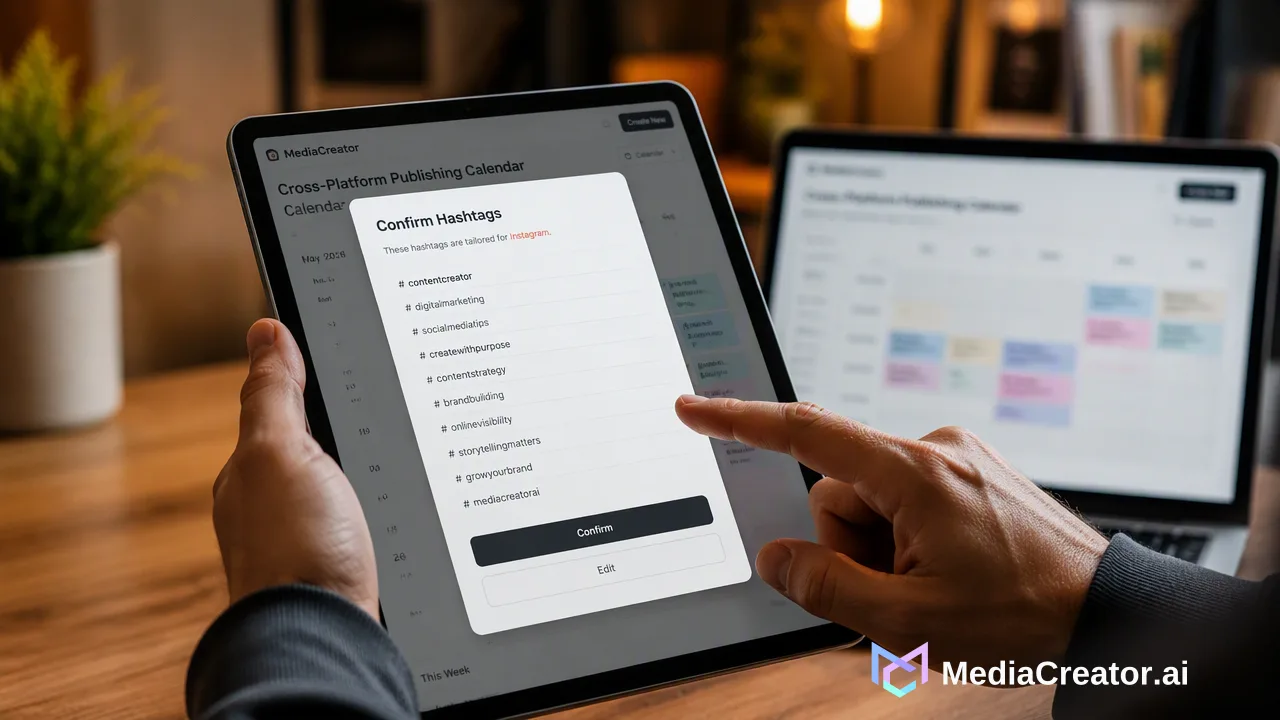
Learn how to build a scalable hashtag library by categorizing tags by content pillar and adapting them for specific platforms. Discover how MediaCreator.ai centralizes this workflow to reduce manual copy-pasting and streamline cross-platform publishing.
A scalable hashtag library is built by categorizing tags according to content pillars and specific platform requirements. By centralizing these sets within your social media hashtag management workflow, you reduce manual copy-pasting and minimize errors during cross-platform publishing. Using a unified platform like MediaCreator.ai allows you to compose posts once, adapt them for specific networks, and maintain a consistent, organized hashtag strategy across all your connected accounts.
Why You Need a Centralized Hashtag Library
Managing hashtags in scattered notes or spreadsheets creates friction in the daily publishing process. When teams rely on manual copy-pasting, they risk using outdated tags, applying the wrong formatting for a specific network, or simply wasting time switching between applications. A centralized hashtag library brings your categorization directly into your publishing environment. Centralizing content management reduces the need for manual copy-pasting and tool switching. By integrating your library with a Social Account Dashboard, you can manage multiple accounts per supported platform from one location. MediaCreator.ai supports TikTok, Instagram, Facebook, and YouTube through secure OAuth 2.0 connections, meaning you can apply your centralized hashtag strategy across these networks without sharing passwords or relying on browser extensions. This unified approach helps teams maintain consistency and speeds up the transition from drafting to scheduling.
Structuring Your Hashtag Library for Scalability
To build a library that scales as your content output grows, organize your hashtags systematically rather than relying on a single, massive list. A structured approach supports relevance and speed when drafting posts.
- Content Pillars: Group tags by your core topics. For example, categorize hashtags by content pillar such as #ProductUpdates, #BehindTheScenes, or #IndustryTips. This helps you quickly locate the most relevant tags for a specific post type.
- Platform-Specific Sets: Platform-specific adaptation is essential for effective social media publishing. What works on Instagram may not format well or reach the right audience on Facebook or YouTube. Create distinct subsets tailored to the conventions of each network.
- Campaign and Event Tags: Maintain a separate category for time-bound campaigns, product launches, or seasonal events. This keeps your evergreen pillars clean while allowing quick access to temporary tags. By structuring your library this way, you create a modular system. When drafting a post, you can select one pillar set, append a campaign tag, and adjust for the platform, rather than typing everything from scratch.
Integrating a Library into Your Social Media Hashtag Management Workflow
A well-structured library is only useful if it integrates smoothly into your daily operations. The goal is to move from drafting to scheduling with minimal friction. MediaCreator.ai supports this by allowing you to compose posts once and adapt them for supported platforms. Start by writing your core caption and inserting your primary content pillar hashtags. Because each network has different character limits and hashtag conventions, you can then adapt the post per platform. Before scheduling, use per-platform previews to verify that your hashtags format correctly. This helps verify that a block of tags doesn't disrupt the visual flow of an Instagram caption or exceed YouTube's description recommendations. Once the hashtags and captions are finalized, place the post on the Cross-Platform Publishing Calendar. This visual calendar displays draft, queued, and published states, giving your team a clear overview of which hashtag sets are being deployed throughout the week.
Leveraging AI for Hashtag Optimization
Artificial intelligence can assist in the heavy lifting of drafting and adapting your hashtag sets for different networks. Acting as a co-pilot for post drafting and workflow assistance, Nova AI can help brainstorm relevant tags based on your content pillars or suggest variations for your campaign sets. Additionally, when you upload media, Quick Caption generates platform-adapted copy. This feature can help integrate your library's hashtags naturally into the generated text, tailoring the output for TikTok, Instagram, Facebook, or YouTube. It is important to maintain editorial oversight. In MediaCreator.ai, Nova AI, Quick Caption, and Content Studio are optional AI features. All AI write actions show a confirm card before publishing, requiring that you always review and approve the final hashtag selection and formatting before it goes live.
FAQ
How often should I update my hashtag library?
You should review and update your hashtag library quarterly or whenever you launch a new content pillar. Regular audits help remove outdated campaign tags and keep your core sets aligned with your current social media hashtag management workflow.
Can I use the same hashtags for TikTok and Instagram?
While some broad industry tags overlap, platform-specific adaptation is essential for effective social media publishing. TikTok and Instagram have different user behaviors and formatting norms. MediaCreator.ai allows you to compose once and adapt your captions and hashtags per platform, helping you meet the specific requirements of each network without starting from scratch.
How does a unified dashboard help with hashtag management?
A unified dashboard centralizes your workflow, reducing the need for manual copy-pasting and tool switching. By connecting your TikTok, Instagram, Facebook, and YouTube accounts through OAuth 2.0, you can manage multiple accounts from one location, apply your hashtag sets consistently, and use per-platform previews to verify formatting before scheduling on the visual calendar.
Get Started with MediaCreator.ai
Discover the power of AI-driven content creation
Related Articles
Continue learning with these related guides
How to Optimize Your Facebook Business Page for Professional Social Media Management
Learn how facebook business page optimization helps teams manage brand presence, collaborate securely via OAuth, and streamline cross-platform publishing.
BlogMastering LinkedIn Consistency: A Workflow Guide to Automated Scheduling
Streamline your scheduling workflow by shifting from manual daily posts to batch planning, visual calendars, and multi-platform management.
Blog