
How to Build a Social CRM Workflow: Connecting Social Engagement to Customer Data
Learn how to build a social CRM workflow. Connect real-time social engagement across platforms to customer records for better sales and support routing.
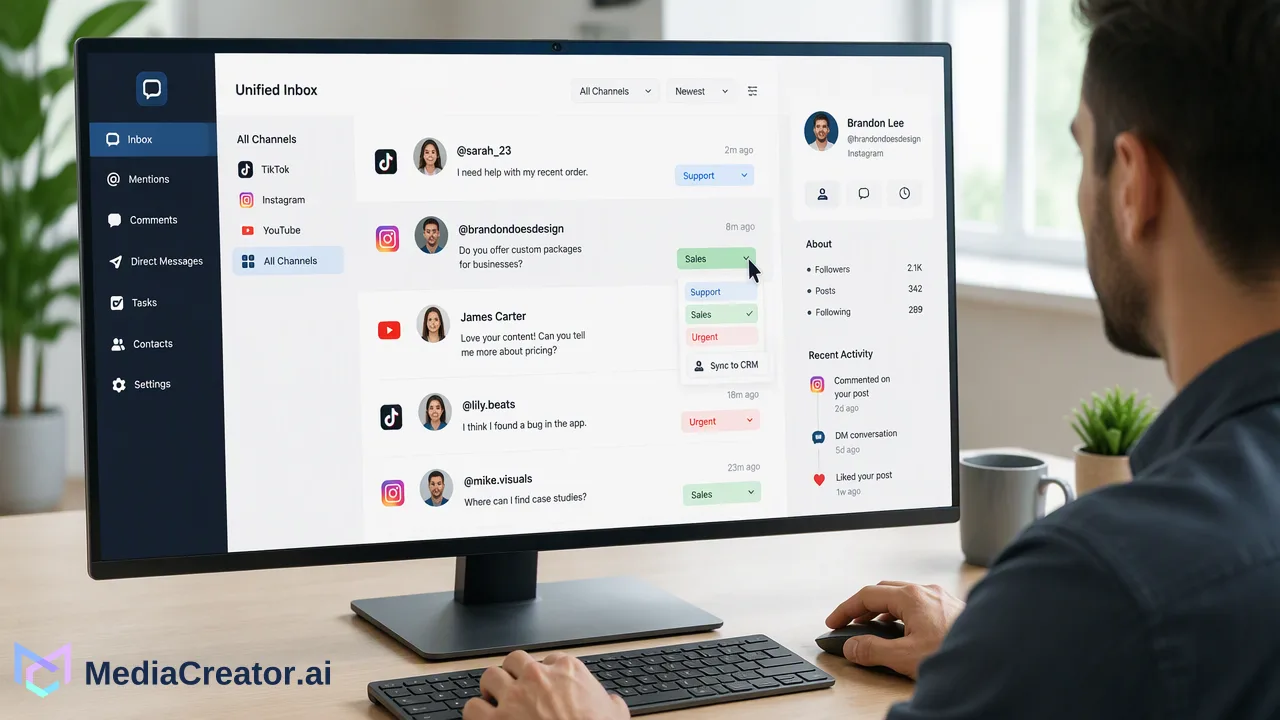
A practical guide to building a social CRM workflow by centralizing multi-platform interactions, routing incoming conversations to sales or support, and enriching customer records while maintaining data privacy.
A social CRM workflow connects incoming social interactions—such as direct messages, public comments, and brand mentions—directly into an organization's customer relationship management processes. Rather than treating social channels as isolated broadcast feeds, this workflow aggregates real-time signals across platforms into a centralized inbox, applies automated routing rules to categorize support inquiries and sales opportunities, and links interaction history with customer profiles to support more contextual, timely follow-up.
The Evolution: Traditional CRM vs. Social CRM
Customer relationship management has traditionally focused on structured, retroactive data. In standard CRM systems, records reflect formal transactions, inbound support tickets, contact form submissions, and scheduled sales calls. While these historical records are essential for tracking account lifecycles, they often miss the rapid, unstructured conversations happening publicly or via messaging channels. A social CRM workflow incorporates real-time social touchpoints into that structured operational framework. When prospects ask product questions in comment threads or existing customers share feedback via direct messages, those interactions represent actionable signals. Integrating these inputs helps teams transition from delayed, reactive follow-ups to immediate engagement based on current audience behavior. | Dimension | Traditional CRM Workflow | Social CRM Workflow | | :--- | :--- | :--- | | Primary Data Inputs | Emails, calls, web forms, billing records | Direct messages, comments, @mentions, social profiles | | Timing & Cadence | Asynchronous, scheduled, or retrospective | Real-time, continuous conversational streams | | Context Captured | Formal transaction and support history | Immediate sentiment, public questions, community feedback | | Operational Goal | Pipeline management and ticket resolution | Contextual relationship building and rapid escalation |
Centralizing Social Signals Across Channels
Before social data can inform customer records, teams must eliminate fragmented channel monitoring. Navigating between native mobile apps and separate browser tabs creates communication silos, increases response latency, and raises the likelihood that critical inquiries are overlooked. MediaCreator.ai addresses this operational challenge through a unified social inbox that consolidates incoming comments, direct messages, and @mentions into a single view. The platform connects supported networks—TikTok, Instagram, Facebook, and YouTube—using direct OAuth 2.0 authentication, avoiding shared passwords or browser extensions. Consolidating multi-platform communications into one dashboard allows teams to triage high volumes of inbound messages systematically before determining how that data should feed into CRM records.
Routing and Prioritization Strategies
Not every social interaction warrants identical handling. A casual emoji comment on a video requires different treatment than a direct message reporting an outage or an enterprise buyer asking about team onboarding. Establishing clear classification rules is essential for operational efficiency. ### Automated Tagging for Operational Ownership Organizations can categorize incoming interactions by topic, channel, and urgency. Automated tagging helps route conversations to the right operational department without manual sorting:
- Support and Service: Tags such as
bug,billing,troubleshooting, ororder-statusdirect tickets to support queues. - Sales and Business Development: Tags such aspricing,demo,enterprise, orfeature-requestflag opportunities for account executives. - Community Management: General remarks, brand compliments, and shared community media stay with social marketing operators. ### Sentiment and Intent Prioritization Analyzing message tone and intent signals helps teams prioritize high-impact messages. Escalating negative sentiment or urgent technical keywords allows service teams to address customer frustration before issues escalate. Similarly, identifying buying intent in public threads enables commercial teams to respond with relevant resources while interest is high.
Enriching Customer Profiles with Social Data
A primary objective of a social CRM workflow is bridging the gap between social handles and internal customer records. When social data is connected to existing contact records, team members gain valuable context that supports more personalized communication. To enrich customer profiles responsibly, organizations can map verified social interactions to contact records when users reach out directly. Retaining context regarding which campaigns a prospect commented on, what platform they prefer for communication, or recurring questions they have asked enables sales and support teams to tailor their responses. Rather than treating every inquiry as an isolated ticket, representatives can reference ongoing conversations, resulting in more cohesive and informed interactions.
Maintaining Compliance and Data Privacy
Syncing conversational data into internal systems introduces compliance and regulatory obligations that organizations must plan for proactively. Operating across public networks requires disciplined governance to safeguard user privacy. Teams should implement several essential data practices:
- Collect Purpose-Specific Information: Capture only data fields necessary for customer support or documented commercial workflows, avoiding extraneous scraping of personal profiles. - Establish Clear Consent and Policies: Ensure published privacy policies clarify how direct messaging and public post interactions are stored or utilized in business workflows. - Define Data Retention Schedules: Regularly review, archive, or purge historical social conversational records in accordance with applicable regional data protection regulations. - Enforce Access Controls: Restrict internal access to synchronized social records so that only authorized sales, marketing, and support personnel can view customer conversational histories.
FAQ
What is the main difference between a standard CRM and a social CRM?
A standard CRM primarily records static, historical touchpoints such as email exchanges, phone calls, form fills, and purchase logs. A social CRM workflow extends these records by incorporating real-time, dynamic social touchpoints—including public comments, mentions, and direct messages across networks—giving teams continuous context on sentiment, questions, and customer interest.
How can organizations ensure social data remains compliant when synced to a CRM?
Organizations should establish clear data retention policies, sync only operational data necessary for sales or support workflows, and respect platform-level privacy controls. Teams must also verify that customer consent frameworks and internal data-protection governance cover information gathered through social messaging channels.
How can teams automate the routing of social interactions to support or sales?
Teams can establish rules that inspect incoming messages for specific keywords, sentiment indicators, or intent patterns. Messages containing account issues or technical troubleshooting terms can be tagged and routed directly to customer service queues, while inquiries discussing features, trials, or procurement can be assigned to sales representatives.
Learn More
Choose the product information that fits the next step in your workflow.
Get Started with MediaCreator.ai
Discover the power of AI-driven content creation
Related Articles
Continue learning with these related guides
Building a Human-in-the-Loop AI Workflow: A Practical Guide
Learn how to build a scalable, human-in-the-loop AI content workflow that protects brand voice, streamlines drafting, and maintains editorial oversight.
BlogPredictive Media Intelligence: A Workflow Guide for Proactive Social Strategy
Learn how a predictive media intelligence workflow helps teams spot conversation trends early, manage brand risk, and plan social content proactively.
Blog