
Maximizing Social Media ROI: A Team-Based Approach to AI-Assisted Workflows
Improve social media ROI with AI-powered scheduling tools. Learn how teams use unified dashboards and AI assistants to streamline content workflows.
Learn how teams can improve social media ROI by integrating AI-assisted drafting, visual calendar management, and unified engagement tools into their daily workflows.
Improving social media ROI requires a shift from manual, fragmented tasks to a unified workflow. By leveraging AI-powered social media scheduling tools, teams can accelerate content drafting while maintaining quality through human-in-the-loop confirmation. Centralizing scheduling, visual calendar management, and engagement into a single dashboard reduces operational friction. This approach supports a consistent brand presence across TikTok, Instagram, Facebook, and YouTube without sacrificing the authenticity that drives audience connection.
The Challenge of Modern Social Media Management
Managing multiple accounts across platforms like TikTok, Instagram, Facebook, and YouTube requires centralized tools to maintain efficiency. Without a unified system, social media managers spend hours logging in and out of native apps, manually resizing media, and tracking conversations across disconnected inboxes. This fragmentation not only drains team resources but also makes it difficult to measure performance and optimize return on investment (ROI). Transitioning from a manual approach to a centralized dashboard fundamentally changes how teams operate.
| Workflow Component | Manual Approach | MediaCreator.ai Dashboard |
|---|---|---|
| Account Access | Password sharing and frequent logins | Secure OAuth 2.0 connections |
| Content Drafting | Separate documents and native app editors | Centralized AI-assisted composition |
| Audience Engagement | Checking individual platform notifications | Unified inbox for all connected accounts |
| By keeping work in one place, teams can redirect the hours previously spent on administrative context-switching toward strategy and community building. |
Streamlining Content Creation with AI
MediaCreator.ai provides specific tools to reduce the time spent on content ideation and formatting. Nova AI acts as a co-pilot for post drafting and workflow assistance, helping teams overcome writer's block and generate initial concepts quickly. For visual assets, Content Studio supports AI image and video generation, keeping media creation within the same platform rather than requiring external design software. Once the core visual message is established, Quick Caption generates platform-adapted copy based on uploaded media. This helps teams tailor their messaging to fit the specific audience expectations of each channel without starting from scratch every time. Crucially, these AI features function as optional assistants rather than autonomous agents. All AI write actions in MediaCreator.ai display a confirm card, requiring user confirmation before publishing. This human-in-the-loop approach ensures that AI-generated content aligns perfectly with brand guidelines and prevents unintended messaging from going live.
Visual Planning and Cross-Platform Consistency
Once content is drafted, teams need a clear overview of their publishing pipeline to maintain a consistent posting cadence. A visual calendar allows teams to manage posts across draft, queued, and published states. This visibility helps marketing teams identify content gaps, coordinate campaigns across multiple channels, and allow managers to review drafts before they are moved into the active queue. Because TikTok, Instagram, Facebook, and YouTube each have unique aspect ratios, character limits, and interface overlays, composing a single post and publishing it everywhere identically often leads to formatting errors. MediaCreator.ai allows teams to compose once, adapt the content for supported platforms, and preview the per-platform rendering before scheduling. This per-platform preview ensures that critical visual elements are not obscured by native app buttons or text overlays, supporting a highly professional presentation.
Centralizing Engagement to Protect Brand Reputation
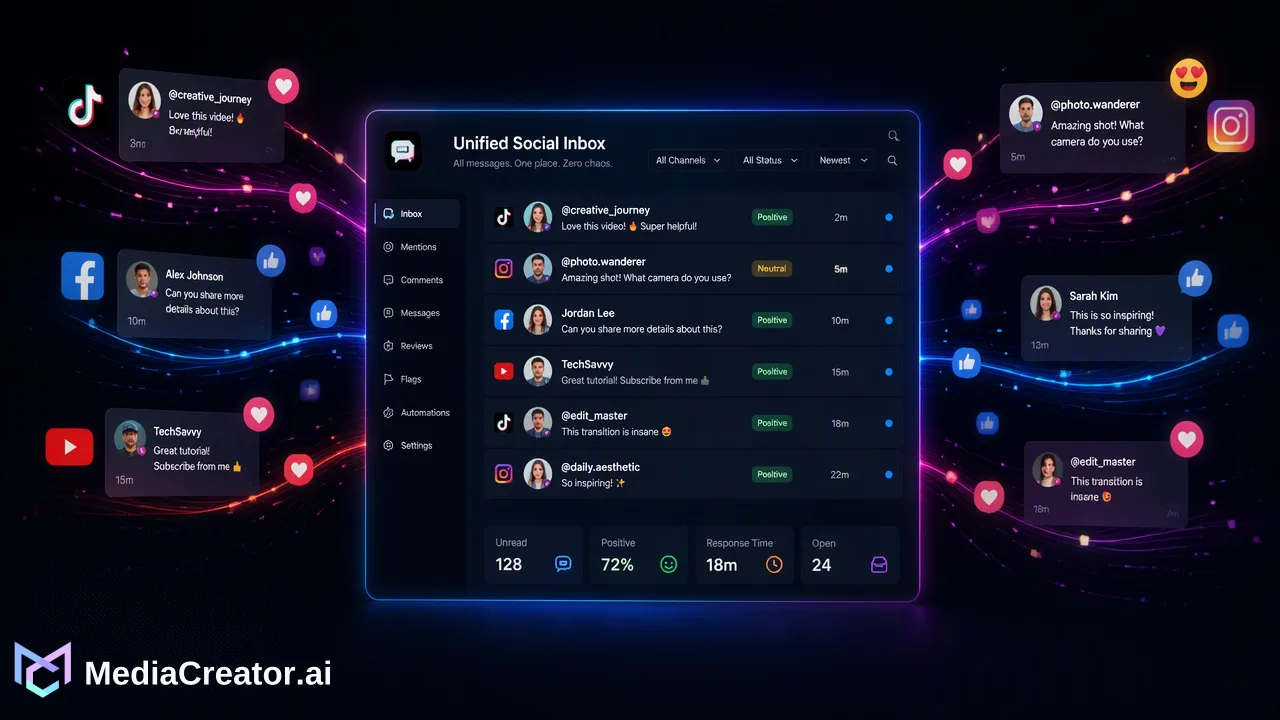
Publishing content is only half of the social media workflow; responding to the resulting audience interaction is equally important for maximizing ROI. A Unified Social Inbox brings comments, direct messages (DMs), and @mentions from connected accounts into one centralized view. Instead of monitoring four different mobile apps or browser tabs, teams can review and reply to audience interactions from a single dashboard. This centralized engagement management supports faster response times, helps teams identify customer support inquiries promptly, and provides a comprehensive view of brand sentiment across all active channels. By consolidating these interactions, teams can ensure that no valuable community engagement falls through the cracks.
Secure Account Management for Teams
Security and access control are foundational to team-based social media management. Traditional methods often involve sharing passwords or relying on fragile browser extensions, which introduces security risks and complicates onboarding when team members change. MediaCreator.ai handles account connections through OAuth 2.0. This standard allows teams to connect supported social accounts securely without sharing credentials. Furthermore, the platform supports multi-account management, meaning agencies or enterprise teams can manage multiple accounts per supported platform from one dashboard. This architecture not only protects brand assets but also streamlines the process of scaling social media operations as a business grows.
FAQ
How does MediaCreator.ai ensure AI-generated content matches our brand voice?
MediaCreator.ai treats AI as a workflow assistant rather than an autonomous publisher. Features like Nova AI and Quick Caption help draft content, but all AI write actions require user confirmation via a confirm card before publishing. This ensures a human always reviews and approves the final messaging.
Can I manage multiple accounts for the same platform?
Yes, the platform supports multi-account management. Teams can connect and manage multiple accounts per supported platform from a single dashboard.
Do I need to share passwords to connect my social accounts?
No. Account connections are handled securely via OAuth 2.0. This eliminates the need for password sharing or browser extensions when connecting your profiles.
What platforms are supported for scheduling?
MediaCreator.ai supports scheduling and publishing for TikTok, Instagram, Facebook, and YouTube.
Get Started with MediaCreator.ai
Discover the power of AI-driven content creation
Related Articles
Continue learning with these related guides
From Data to Decisions: A Framework for Actionable Social Listening
Learn how to transform social listening metrics into strategic KPIs by bridging reactive monitoring, unified inbox workflows, and long-term planning.
BlogBuilding a Unified Social Media Tech Stack: A 2026 Guide to Integrated Workflows
Explore how an integrated social media management tech stack unifies scheduling, AI drafting, and inbox tracking across major networks.
Blog