
Streamlining Agency Workflows: Mastering Multi-Account Management with MediaCreator.ai
Discover how agencies use a multi-account social media management platform to centralize TikTok, Instagram, Facebook, and YouTube workflows securely.
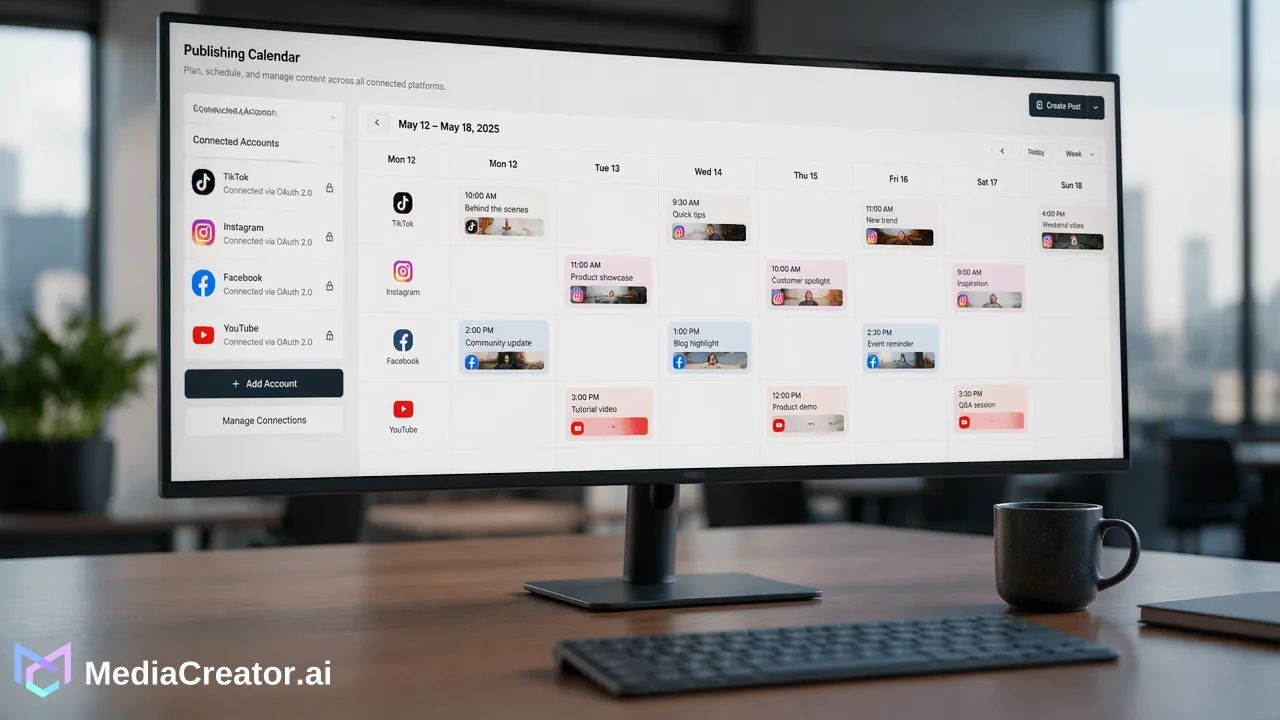
A practical guide for social media agencies on using MediaCreator.ai's Social Account Dashboard and Cross-Platform Publishing Calendar to manage multiple client accounts efficiently. Learn how visual planning, per-platform previews, and secure OAuth connections streamline content operations.
Agencies can maximize efficiency by using a multi-account social media management platform like MediaCreator.ai to centralize operations across TikTok, Instagram, Facebook, and YouTube. By leveraging the Social Account Dashboard, teams connect and manage multiple client profiles via secure OAuth 2.0 connections, entirely eliminating the need for password sharing. The Cross-Platform Publishing Calendar further supports this workflow by allowing teams to visualize their entire content pipeline—tracking draft, queued, and published states in a single, unified view. To maintain strict quality control and brand safety, agencies can use per-platform previews to verify content is perfectly formatted for each specific network before scheduling. Additionally, when utilizing the platform's AI tools for drafting or ideation, teams rely on confirm-first AI workflows to review, refine, and approve all generated copy before it ever goes live.
The Challenge of Multi-Account Management for Agencies
Handling social media for multiple clients introduces significant operational complexity, especially when balancing distinct networks like TikTok, Instagram, Facebook, and YouTube. Marketing teams frequently switch between different native applications, manage scattered login credentials, and struggle to maintain a cohesive overview of upcoming cross-channel campaigns. When an agency scales its client base, relying on manual posting or fragmented tools often leads to formatting errors, missed publishing windows, and highly inefficient internal collaboration. To operate effectively, agencies need centralized tools to manage multiple accounts across these core platforms. A unified approach helps teams consolidate their daily tasks, reducing the friction of logging in and out of individual client profiles. By bringing these distinct channels into one interface, social media managers can focus on high-level content strategy, community engagement, and campaign execution rather than getting bogged down by administrative overhead. Managing video-heavy platforms like YouTube and TikTok alongside the mixed-media environments of Facebook and Instagram requires a streamlined system that keeps all assets and schedules organized in one accessible location.
Centralizing Operations with the Social Account Dashboard
Connecting client profiles securely is the foundational step in any agency workflow. MediaCreator.ai addresses this critical requirement through its Social Account Dashboard, which allows teams to connect supported social accounts using standard OAuth 2.0 protocols. This method establishes a secure, token-based connection directly with the social networks, meaning agencies do not need to request, store, or share native passwords with their staff or contractors. Furthermore, this secure connection process requires no browser extensions to function, simplifying client onboarding. Once authenticated, teams can manage multiple accounts per supported platform from one dashboard. This capability is particularly useful for agencies handling several distinct brands, franchise locations, or regional sub-accounts for a single enterprise client. Keeping all these connections in a single dashboard reduces the risk of posting content to the wrong account—a common pitfall when managing dozens of logins manually.
Manual Workflow vs. MediaCreator.ai Workflow
| Workflow Aspect | Manual Process | MediaCreator.ai Dashboard |
|---|---|---|
| Authentication | Sharing passwords via spreadsheets or secure notes. | OAuth 2.0 connection with no password sharing. |
| Account Access | Logging in and out of individual native apps. | Managing multiple accounts per platform in one view. |
| Platform Support | Navigating separate interfaces for each network. | Centralized access for TikTok, Instagram, Facebook, and YouTube. |
| Client Onboarding | Requesting sensitive login credentials directly. | Clients authorize access securely via OAuth prompts. |
Visualizing Your Strategy: The Cross-Platform Publishing Calendar
After securing account access, agencies need a clear, intuitive way to plan and schedule content. The Cross-Platform Publishing Calendar provides a visual tool for composing, adapting, and scheduling posts across all connected client profiles. Instead of relying on disconnected spreadsheets or external project management boards to track what goes live and when, teams can view their entire content pipeline directly within the scheduling interface. The visual calendar helps teams track content through its various lifecycle stages, displaying draft, queued, and published states in a single comprehensive view. This transparency supports better internal collaboration, as account managers and creators can quickly identify which posts are ready for client approval, which are actively queued, and which have already been published. By composing a post once and scheduling it visually, agencies can maintain a consistent publishing cadence across multiple platforms without duplicating effort. This bird's-eye view is essential for coordinating large-scale campaigns, such as a product launch that requires synchronized messaging across YouTube, Facebook, Instagram, and TikTok simultaneously.
Ensuring Quality with Per-Platform Previews and AI
Different social networks have distinct aspect ratios, character limits, and formatting conventions. A video that looks perfect on YouTube may require specific cropping or caption adjustments for TikTok or Instagram. To address this, MediaCreator.ai allows teams to compose posts and adapt them for supported platforms while previewing the per-platform rendering before publishing. This helps teams verify that captions, hashtags, and media align perfectly with each network's specific requirements, reducing the risk of formatting errors going live and protecting the client's brand image.
Integrating AI Assistance Safely
Agencies can also utilize optional AI features to speed up their workflows. Nova AI acts as a co-pilot for post drafting and workflow assistance, while Quick Caption generates platform-adapted copy based on uploaded media. Additionally, Content Studio supports AI image and video generation for rapid media ideation. However, maintaining brand voice and factual accuracy remains critical for agency operations. To support strict quality control, AI write actions show a confirm card before publishing. This confirm-first behavior means that AI-generated content does not publish automatically. A human team member must always review, edit, and approve the copy, verifying that the final output aligns with the client's specific messaging guidelines before it is added to the publishing queue.
FAQ
How does MediaCreator.ai handle multiple accounts for the same platform?
The Social Account Dashboard allows agencies to connect and manage multiple accounts per supported platform—specifically TikTok, Instagram, Facebook, and YouTube—from a single centralized interface. This means a team can manage several different client Instagram profiles without needing to log in and out of the native application.
Is password sharing required to connect social accounts?
No. MediaCreator.ai uses OAuth 2.0 for all account connections. This protocol securely authenticates profiles directly with the social networks, allowing agencies to manage accounts without ever requiring, storing, or sharing native passwords.
Can I preview how my post will look on different platforms before it goes live?
Yes. The platform includes per-platform rendering previews within the Cross-Platform Publishing Calendar. This allows teams to see exactly how their content, captions, and media will appear on TikTok, Instagram, Facebook, and YouTube before finalizing the schedule.
Does AI-generated content publish automatically?
No. All AI write actions within MediaCreator.ai require a confirm-first step. The system displays a confirm card so users can review, edit, and approve the generated text or media. This supports human oversight and quality control before anything is published to a client's account.
Get Started with MediaCreator.ai
Discover the power of AI-driven content creation
Related Articles
Continue learning with these related guides
Beyond Social Listening: How to Build an Audience Intelligence Workflow
Move beyond reactive social listening. Learn how to build an audience intelligence workflow to turn engagement data into an informed content strategy.
BlogFrom Data to Decisions: A Framework for Actionable Social Listening
Learn how to transform social listening metrics into strategic KPIs by bridging reactive monitoring, unified inbox workflows, and long-term planning.
Blog