
How to Manage Social Media Comments in One Place: A Daily Inbox Routine
A step-by-step routine for handling comments, DMs and mentions from TikTok, Instagram, Facebook and YouTube accounts in one inbox, with triage rules.
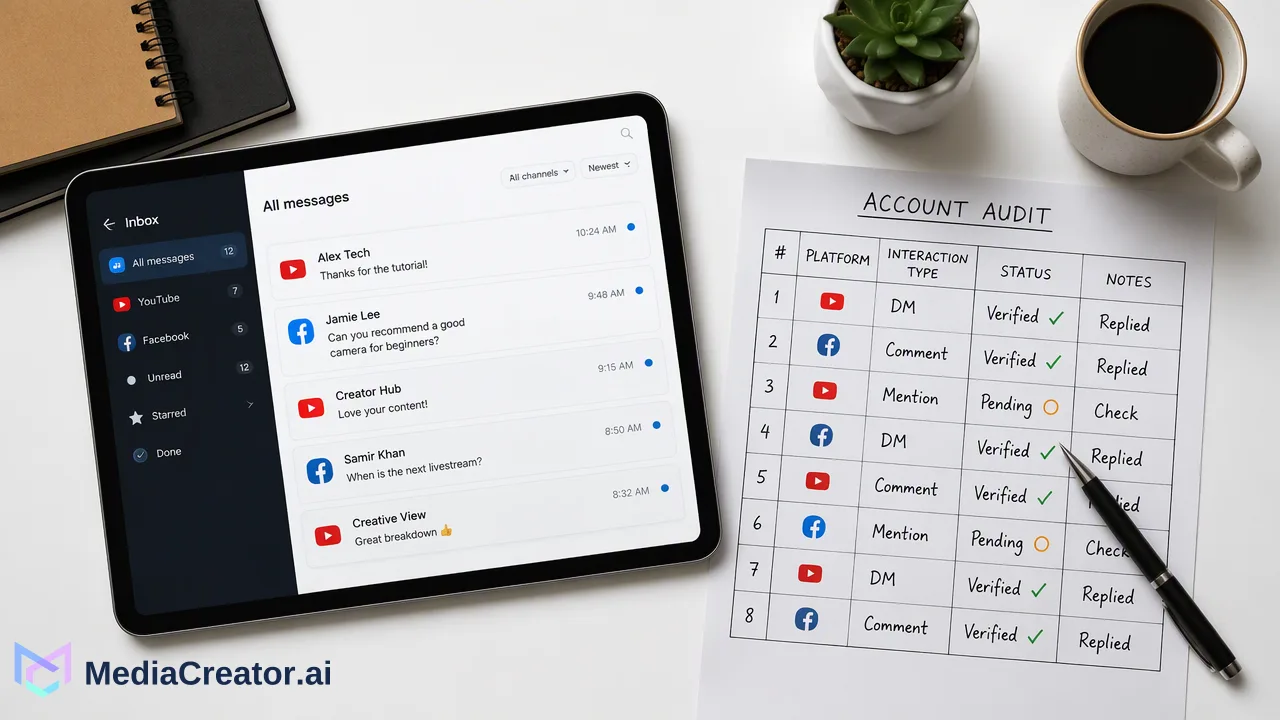
A step-by-step routine for pulling supported comments, DMs and @mentions from several connected accounts into one inbox, filtering by account, triaging and replying.
To manage social media comments in one place, connect each account to a unified inbox through official OAuth, then work through a fixed daily routine: filter by account, triage by urgency, reply with context, and record anything that needs follow-up. One inbox removes the need to open four apps, but what appears in it still depends on each platform, the account type and the permissions granted. The routine below works for a solo creator with three accounts or a small team covering a dozen.
What a unified inbox can show, and what decides it
A unified inbox collects comments, direct messages and @mentions from connected accounts into one list. Most comparison articles stop there, but the practical question is which interactions will actually show up. Three things decide that:
| Factor | What to check | Example |
|---|---|---|
| Platform | What the network makes available to connected tools | YouTube's CommentThreads reference describes comment threads as a top-level comment plus replies |
| Account type | Whether the account is a business, creator or personal profile | Meta's Instagram Platform Overview states its Instagram APIs require a professional account |
| Permissions | Which permissions were approved during connection | Messaging on Instagram uses separate message permissions from basic profile access |
In MediaCreator.ai, the unified social inbox covers supported comments, DMs and @mentions from eligible connected TikTok, Instagram, Facebook and YouTube accounts. Available interaction types follow the platform, account type and OAuth permissions, so it is worth checking each account once after connecting rather than assuming parity.
Step 1: Connect accounts and confirm what comes through
- Connect each TikTok, Instagram, Facebook and YouTube account through the official OAuth sign-in. No social-account password is shared and no browser extension is needed.
- Approve the permissions requested during sign-in; declining some may limit which interactions appear later.
- For each account, leave a test comment on a recent post (or ask a colleague to) and confirm it appears in the inbox.
- Note any account where comments, DMs or mentions do not appear, and check its account type on the platform side.
Keep a simple table of accounts and the interaction types each one shows. It saves time when a teammate asks why a message is missing.
Step 2: Filter by account and set a triage order
Start each session by filtering the inbox to one account at a time, beginning with the account that receives the most time-sensitive messages. Then work through a fixed priority order:
- Direct questions about orders, bookings, availability or how something works.
- Complaints or problems that could escalate if left unanswered.
- Sales or partnership signals, such as requests for rates or collaboration.
- General feedback and praise, which can be answered in a batch.
- Spam and abuse, handled using the platform's own hide, delete or report tools.
DMs deserve a place near the top. Meta's developer documentation on Instagram API with Instagram Login, Send Messages describes a standard 24-hour window for responding to a message a user sends to an Instagram professional account through its API, so messages left for a day can become harder to answer from connected tools.
Step 3: Reply with context, not just speed
Before replying, open the post the comment belongs to. A short comment like "price?" or "where is this?" only makes sense next to the caption and media. Then:
- Answer the question asked, in the tone of that platform's audience; a YouTube viewer asking a technical question usually wants more detail than a TikTok viewer.
- Move private details to DMs when an answer involves order numbers, addresses or account issues.
- Keep a shared document of approved answers for frequent questions such as shipping times, opening hours or where to find a product link, and adapt them rather than pasting them unchanged.
When posts are scheduled from the same workspace, using the social media scheduler, the person replying can see what was published and when, which helps when a comment refers to a specific post or campaign.
Step 4: Share the inbox across a team
For teams of two or more, the main risk is two people answering the same comment, or nobody answering it. A light structure helps:
- Split by account or platform, so each person owns a clear set of connected accounts.
- Agree on a hand-off rule for messages outside someone's area, such as sending billing questions to one named person.
- Set response windows that the team can realistically meet, for example twice per working day for comments and more often for DMs.
- Review missed items weekly, looking for questions that kept coming up; these are often good prompts for a pinned comment, an FAQ post or a caption change.
Step 5: Plan for history limits
Inbox history affects how far back a team can look. In MediaCreator.ai, comment and DM history is 30 days on the Creator and Team plans and unlimited on Business; Social Inbox is available on paid plans. For teams with a 30-day window, it helps to copy anything that needs long-term follow-up, such as a partnership request or a recurring complaint, into the team's own tracker before it ages out. Plan details are listed on the pricing page.
Common mistakes when managing comments from several accounts
- Assuming every account shows the same interactions. Account type and permissions differ, so check each connection once.
- Replying without opening the post. Context helps avoid confusing or off-topic answers.
- Working newest-first only. Older unanswered questions are easy to bury; filter by account and clear the backlog in priority order.
- Using identical replies on every platform. Adapt tone and length to the audience.
- Keeping follow-ups only in the inbox. Move anything long-running into a tracker, especially when history is time-limited.
FAQ
How can teams manage social media comments in one place?
Connect each account to a unified inbox through official OAuth, confirm which interaction types each account shows, then follow a daily routine of filtering by account, triaging by urgency and replying with the post in view.
Why do some comments or messages not appear in a unified inbox?
Availability depends on the social platform, the account type and the permissions granted during connection. For example, Meta documents that its Instagram APIs work with professional accounts, so a personal profile may show less.
How often should a small team check a shared social inbox?
Set a rhythm the team can keep, such as twice per working day for comments and more often for DMs, and assign each connected account to a named owner so nothing is answered twice or missed.
How long does MediaCreator.ai keep inbox history?
Comment and DM history is 30 days on Creator and Team plans and unlimited on Business. Individual interaction types still depend on the platform, account type and OAuth permissions.
Learn More
Choose the product information that fits the next step in your workflow.
Get Started with MediaCreator.ai
Discover the power of AI-driven content creation
Related Articles
Continue learning with these related guides
Centralizing Social Media Engagement: How to Manage Comments, DMs, and Mentions from One Unified Inbox
Learn how a unified social media inbox centralizes comments, direct messages, and mentions from TikTok, Instagram, Facebook, and YouTube.
BlogHow to Manage All Your Social Media Accounts in One Place
Consolidate TikTok, Instagram, Facebook, and YouTube into one dashboard. Schedule posts, track publishing, and handle community engagement.
BlogManage All Your Social Media in One Place
Learn how to simplify multi-platform content management through centralized social media management, saving time and amplifying your reach.
Blog